Questions to Ask Payroll Software Vendors Before Signing
Learn what to ask payroll vendors before signing locks you in.

- Written by
- Payroll Picks Editors
- Published
- September 27, 2026
- Reading time
- 11 min read
- Sources cited
- 8 sources ↓
What this covers
- The compliance and financial exposure a bad vendor leaves you holding
- Compliance and tax coverage questions that reveal whether the vendor owns the obligation or just the software
- Pricing transparency questions that expose what the actual invoice will look like
- Implementation and data migration questions that distinguish a smooth go-live from a costly delay
Signing with the wrong payroll vendor costs money, time, and trust, and undoing that decision once pay rules and tax registrations are buried inside a system is its own project. This piece lays out the questions to ask before a contract is signed, organized around the places vendors most often leave gaps: accuracy, compliance, pricing, implementation, integration, security, and support.
Payroll software is the system of record for compensation. Every pay rule, every correction, every tax filing runs through it. Replacing the platform later amounts to migrating an organization's entire compensation history, not swapping one tool for another. Pay rules, tax registrations, deduction codes, and years of employee records all live inside whatever system gets picked first, and pulling them out cleanly, without dropping a decimal or misfiring a state tax code, takes real time and real money to do right.
That's part of why so many companies stay put even when they're unhappy with what they have. Almost half report dissatisfaction with their current payroll system, and most of those same companies signed their contracts without putting the vendor through a serious pre-purchase evaluation. The switching cost was baked in from day one. Nobody noticed until the invoices and the errors started piling up.
None of this stays theoretical for long, either. More than half of all U.S. workers have faced a late or incorrect payment at some point in their careers. A vendor's shortcomings appear not in a line item in a back-office report but in the lives of people who depend on that paycheck landing on time, causing a missed rent payment, a bounced check, or an employee quietly updating a resume. Payroll failure is one of the few software failures that lands directly on someone's kitchen table.
The compliance and financial exposure a bad vendor leaves you holding
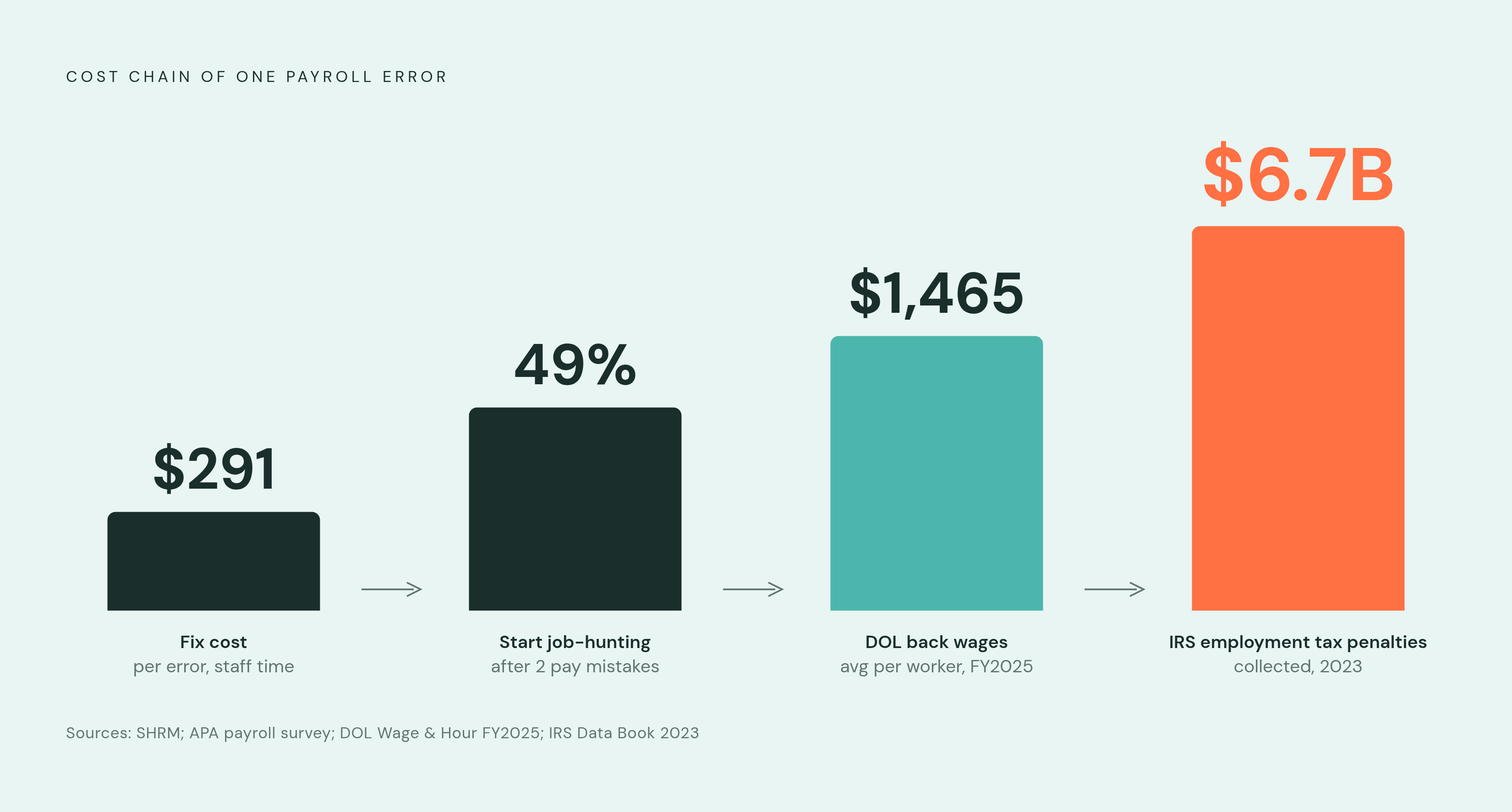
The numbers on payroll accuracy are not reassuring. One out of every five payroll cycles still contains some kind of error, and roughly one in five U.S. employees gets caught in a payroll mistake in any given year https://www.yomly.com/payroll-statistics/ https://www.easyclocking.com/resources/benchmarks/payroll-error-benchmarks-2025. Each error averages $291 in staff time and rework to fix, a figure that sounds modest until it gets multiplied across a workforce and a full year of pay cycles https://www.easyclocking.com/resources/benchmarks/payroll-error-benchmarks-2025. Errors aren't just an accounting annoyance, either: 49% of employees say two pay mistakes are enough to start looking for a new job https://www.easyclocking.com/resources/benchmarks/payroll-error-benchmarks-2025. Payroll accuracy functions as retention infrastructure, whether or not anyone in finance has framed it that way.
The regulatory exposure compounds all of this, and it lands on the employer regardless of whose software miscalculated the withholding. The Department of Labor's Wage and Hour Division recovered more than $259 million in back wages for close to 177,000 workers in fiscal year 2025, an average of $1,465 per worker https://tax.thomsonreuters.com/blog/why-payrolls-easy-label-is-costing-companies-and-how-leaders-can-take-ownership-like-a-boss/. The IRS can levy penalties up to $340 per late or incorrect information return, and $680 if the disregard is judged intentional https://tax.thomsonreuters.com/blog/why-payrolls-easy-label-is-costing-companies-and-how-leaders-can-take-ownership-like-a-boss/. In fiscal year 2023, the most recent year with published figures, the agency collected $6.7 billion in employment tax penalties, with failure-to-deposit penalties making up the largest share https://fridayapp.com/payroll-software-cost/. A survey of 1,000 HR and finance professionals conducted in October 2025 found that one in three employers had already been penalized for noncompliance within the past year https://www.paycom.com/resources/blog/choosing-the-best-payroll-software-in-2026/.
None of that liability belongs to the vendor. And 2026 is shaping up to be a genuinely harder year to stay compliant in: reporting standards are tightening, pay transparency laws are active or newly enacted in Minnesota, Illinois, Vermont, and California, and tax-filing systems are being modernized. Separately, the IRS assessed over $26 billion in civil penalties for employment tax issues in 2023, with $6 billion of that figure specifically related to employment taxes.
Compliance and tax coverage questions that reveal whether the vendor owns the obligation or just the software
The single most important question to ask a vendor is blunt: does it guarantee error-free tax filings and deposits, and when something goes wrong anyway, who actually eats the liability? Most software-only products answer this in the fine print by putting the liability back on the buyer. A vendor that functions as a genuine service partner, rather than just a license, takes that responsibility itself, and it pays to ask for the actual contract language rather than a sales rep's summary of it.
Jurisdiction coverage matters just as much, and it decides whether the previous question is even relevant. Can the system handle federal, state, and local withholding everywhere the company currently has employees, and everywhere it's likely to expand next? With remote work now standard for 73% of professional teams, multi-state compliance isn't a rare edge case anymore, it's the baseline https://getpayroll.com/21-essential-questions-to-ask-a-payroll-service-provider/. Ask specifically how the system updates nexus and withholding when someone relocates, and whether earnings and tax-code mapping happens automatically or whether someone on the internal team still has to do it by hand. Manual mapping is where misclassification risk quietly accumulates, one overlooked state form at a time.
Compliance updates deserve their own line of questioning. How does the vendor push out changes like minimum wage increases, paid leave rate adjustments, or new pay transparency rules, and is that coverage baked into the base contract or billed as an add-on? A concrete test: ask how the vendor actually notified and updated clients for the 2026 pay transparency changes rolling out in Minnesota, Illinois, Vermont, and California. A vague answer here is itself an answer, and it should be treated as one.
A strong partner takes the notice, researches it, and resolves it directly on the employer's behalf. A software-only vendor tends to route the customer to a help article and leaves them to sort it out. That gap, ownership versus deflection, is usually the clearest signal of what kind of relationship a buyer is actually entering.
Pricing transparency questions that expose what the actual invoice will look like
Payroll pricing in 2026 mostly runs on a hybrid model, combining a base platform fee, a per-employee-per-month charge, and usage-based fees stacked on top. Industry forecasts point to a 3 to 6 percent rise in PEPM rates as vendors add analytics, multi-state filing automation, and deeper integrations https://lifthcm.com/article/payroll-software-costs-small-vs.-mid-market. Enterprise tiers start north of $1,000 and bring advanced compliance monitoring, AI-driven error detection, benefits administration, HRIS integration, and dedicated account management https://unclekam.com/tax-pro-tools/payroll-software/payroll-software-pricing/.
Those tier labels only mean something once they're translated into real dollars, and here's where the gap between the pricing page and the actual invoice opens up. A 75-employee company paying a common mid-market rate, $20 base plus $8 per employee, costs around $7,440 a year https://lifthcm.com/article/payroll-software-costs-small-vs.-mid-market. A 350-employee firm on a $300 base plus $12 per employee can reach $54,000 a year https://lifthcm.com/article/payroll-software-costs-small-vs.-mid-market. Put numbers like these in front of a vendor directly during negotiation, not after the contract is signed.
The real cost usually lives in what the pricing page omits. Off-cycle runs, bonus payments, termination checks, and corrections run $10 to $75 each, so ask for the exact per-run fee and how often a business your size typically triggers them https://fridayapp.com/payroll-software-cost/. Growth carries its own trap: a 200-employee company adding time tracking and benefits integration can watch its per-employee-per-month rate climb from $10 to $18, an 80 percent jump https://lifthcm.com/article/payroll-software-costs-small-vs.-mid-market. The baseline inclusions to demand at no extra cost are automatic tax deposit scheduling and filing for every registered state, year-end W-2 and 1099 preparation and filing, direct deposit processing, new-hire reporting, garnishment processing and remittance, automatic compliance updates, employee self-service for pay stubs and W-2 access, and proactive multi-state registration support. Entry-level plans run roughly $30–$50 monthly plus per-employee fees, covering core payroll, automated tax calculations, basic direct deposit, employee self-service, and standard tax form filing. Mid-tier plans run roughly $75–$150 monthly plus per-employee costs, adding multi-state payroll, garnishment handling, time tracking, and expanded reporting. Usage fees typically run $1–$3, and vendors should clarify what counts as a billable event. Absorbed administrator labor from workarounds is estimated at $4,500–$8,000 annually in staff time when a system requires manual reconciliation or spreadsheet backup.
Implementation and data migration questions that distinguish a smooth go-live from a costly delay
Timelines vary enormously depending on company structure, and vendors should get pinned down on where a given business actually falls rather than a generic estimate.
What happens when implementation goes badly isn't hypothetical. In early 2025, city workers in Seattle filed a class action lawsuit after months of pay discrepancies, missing overtime, and misclassified benefits followed a Workday software rollout. On paper, the rollout looked like modernization. In practice, it eroded trust with the workforce and turned into litigation, which is exactly the outcome every question in this piece is trying to prevent.
Data migration deserves scrutiny separate from the general timeline. Historical pay records, deduction histories, compliance documentation, and employee records all have to move over accurately, so ask a vendor directly what data format it requires, who actually performs the migration, and how accuracy gets validated before anyone flips the switch to go live.
Parallel payroll runs are not optional for any implementation worth taking seriously. Running the old system and the new one side by side, on the same pay cycle, is how calculations get confirmed before the old system is retired for good. Ask explicitly whether the vendor supports parallel runs and for how long. A vendor that resists or discourages this should be treated as a red flag.
Integration and scalability questions that expose whether the system will create new silos as you grow
Someone ends up bridging the gap by hand whenever the payroll system doesn't cleanly integrate with the HRIS, time-tracking tool, or benefits platform, and that someone is usually the same overworked administrator every pay cycle.
Payroll errors after go-live rarely come from a dramatic outage. They come from small mismatches that compound quietly, as when a pay rate updated in the HRIS never syncs to the payroll engine, a webhook from a time-tracking tool fails without alerting anyone, or a timezone conversion shifts hours into the wrong pay period. Individually, each of these looks minor. Collectively, they create a kind of financial drift nobody notices until the numbers stop reconciling.
Manual timesheets carry error rates of 1 to 8 percent across all entries, so ask pointedly whether a vendor's time-tracking integration eliminates manual entry altogether or just reduces it https://www.easyclocking.com/resources/benchmarks/payroll-error-benchmarks-2025. Spreadsheets persist anyway: 51% of companies still rely on them somewhere in the payroll process, often precisely because the payroll system doesn't integrate cleanly with HR, time tracking, or benefits.
The direct questions to bring into a vendor call: does the system offer native integrations with the HRIS, benefits platform, accounting software, and time-tracking tools already in use, or does it depend on third-party middleware that introduces its own points of failure? What does the API documentation actually look like, and can an internal team or a third-party developer access it without paying a separate licensing fee? And when a sync between systems fails, does the platform surface that failure immediately, or does the error sit quietly until a payroll run finally catches it?
Security questions that match the sensitivity of what payroll data contains
Payroll data amounts to a complete profile of someone's financial and personal identity: name, address, Social Security number, bank account details, full compensation history. Security practitioners describe it as the crown jewels of enterprise data, and that's less an exaggeration than an accurate description of what a breach would actually expose.
The threat landscape backs that up. The Data Breach Investigations Report found ransomware attacks up 37 percent year over year and vulnerability exploitation as an entry point up 34 percent, though that report doesn't isolate a payroll-specific figure. Direct deposit diversion, redirecting someone's paycheck to a fraudulent account, is a growing and specific target for cybercriminals within that broader trend.
Regulatory pressure is climbing in step, though coverage isn't uniform across states. Virginia's data privacy law explicitly carves out employee and payroll data from its scope, so what's required varies by jurisdiction and needs checking against the states where a company actually employs people.
Ask a vendor what certifications it holds, SOC 2 Type II, ISO 27001, and when the most recent audit was completed. Ask for the actual audit report. How is data encrypted both in transit and at rest, where are the servers physically located, and what are the disaster recovery and uptime commitments? What specific controls stop unauthorized changes to direct deposit information, given that it's one of the most common fraud vectors in payroll systems? And when a breach happens, what's the notification timeline, who gets told, and what remediation does the vendor actually provide, rather than simply refer a customer to?
Support model questions that determine who answers when something goes wrong at 4 p.m. on payday
Small business owners already spend upwards of 4.5 hours per pay period correcting data entry mistakes or chasing down automated support bots, and that's before anything has actually gone wrong https://getpayroll.com/21-essential-questions-to-ask-a-payroll-service-provider/. It's the baseline tax of running payroll on a system that requires babysitting.
The average small business spends more than 40 hours a month on manual payroll processing, hours that a well-built system with real support behind it is supposed to reclaim, not redistribute into a different kind of manual work https://savvyhrms.com/cloud-based-payroll-software-questions-checklist/. The 2024 tax year alone saw the IRS issue more than 20 million notices to taxpayers, and a compliance question tends to arrive with a deadline attached and very little patience for a slow support queue https://getpayroll.com/21-essential-questions-to-ask-a-payroll-service-provider/.
The questions that matter here are concrete. Who answers when a payroll run breaks: an actual person with authority to fix it, or a ticketing system https://fridayapp.com/payroll-software-cost/? Is support included in the base contract, or does faster response time cost extra at precisely the moment it's needed most? Does the support team include people who understand tax compliance specifically, or only people trained to navigate the software's own interface? A vendor that can't answer these in specifics, rather than in reassurances, is telling a buyer something important before the contract is ever signed. Usage fees typically range $1–$3 per event https://lifthcm.com/article/payroll-software-costs-small-vs.-mid-market. Entry-level payroll software plans typically start around $30–$50 monthly plus per-employee fees https://unclekam.com/tax-pro-tools/payroll-software/payroll-software-pricing/. Mid-tier payroll software packages cost $75–$150 monthly plus per-employee costs https://unclekam.com/tax-pro-tools/payroll-software/payroll-software-pricing/. The time cost of workarounds adds $4,500–$8,000 annually in absorbed administrator labor https://netchex.com/blog/the-hidden-costs-of-cheap-payroll-software-what-youre-actually-paying/. Small, standard payroll software setups often take 4–8 weeks for implementation https://www.hrmorning.com/articles/payroll-software-faqs/. Multi-entity organizations typically need 3–6 months to complete payroll software implementation, rules configuration, data migration, and validation https://www.hrmorning.com/articles/payroll-software-faqs/. According to the Alight Global Payroll Complexity Report, 51% of companies still rely on spreadsheets somewhere in their payroll process https://www.workzoom.com/blog/7-signs-your-payroll-system-is-failing/. The IRS assessed over $26 billion in civil penalties for employment tax issues in 2023 https://getpayroll.com/21-essential-questions-to-ask-a-payroll-service-provider/. In 2023, the IRS assessed more than $6 billion in civil penalties specifically related to employment taxes https://getpayroll.com/21-essential-questions-to-ask-a-payroll-service-provider/.
Methodology & sources
- 25 Critical Payroll Software FAQs HR Teams Ask Before Buying
Provided implementation timeline figures for small setups (4–8 weeks) and multi-entity organizations (3–6 months).
- 21 Essential Questions to Ask a Payroll Service Provider - GetPayroll
Supplied figures on IRS civil penalties for employment taxes, the 73% remote work statistic, and time costs small business owners face on payroll.
- 10 Questions to Ask Before Buying Cloud-Based Payroll Software in 2026
Provided the figure that small businesses spend more than 40 hours a month on manual payroll processing.
- https://www.yomly.com/payroll-statistics/
Supplied statistics on payroll error frequency, including that one in five payroll cycles contains an error.
- https://tax.thomsonreuters.com/blog/why-payrolls-easy-label-is-costing-companies-and-how-leaders-can-take-ownership-like-a-boss/
Provided the Department of Labor Wage and Hour Division recovery figures and IRS penalty amounts per late or incorrect information return.
- https://netchex.com/blog/the-hidden-costs-of-cheap-payroll-software-what-youre-actually-paying/
Provided the estimate of $4,500–$8,000 annually in absorbed administrator labor for systems requiring manual reconciliation.
- https://fridayapp.com/payroll-software-cost/
Supplied the $6.7 billion IRS employment tax penalty figure, the per-run fee range for off-cycle payroll, and context on support response costs.
- https://unclekam.com/tax-pro-tools/payroll-software/payroll-software-pricing/
Provided pricing tier ranges for entry-level and mid-tier payroll plans and enterprise tier starting costs.