Payroll Software Implementation Timeline for Growing Businesses
Rushing payroll implementation invites compliance penalties and employee dissatisfaction.

Payroll implementation is a multi-phase project, covering data migration, system configuration, integration testing, and staff training, in that rough order, and the businesses that treat it like a weekend software update are the ones who end up in the IRS's penalty statistics. The agency estimates that 40% of small businesses pay a payroll penalty every year, usually for a filing mistake or a missed deadline, and a poorly sequenced implementation is one of the more common ways that risk gets introduced instead of removed. A 2024 study found that 42% of employees said payroll mistakes hurt their job satisfaction, which makes this a retention problem as much as a compliance one. It tends to land hardest on growing companies right when their workforce is getting more complicated, contractors, multi-state hires, new benefit tiers, at the exact moment leadership wants the new system live yesterday.
How long implementation takes, and what drives the range
Timelines vary more than most vendor sales calls let on, and the range itself tells you something about where the risk sits. A small business on a platform built with owned infrastructure, Deel is one example, can go live in one to two weeks. A large organization with thousands of employees and layered configurations can take six months or longer. In the middle of the market, the range narrows: companies with 50 to 200 employees mostly are in the 3 to 4 month window, while larger organizations tend toward six. Some small and mid-sized companies compress this into 4 to 8 weeks, but that only works when the data going in is already clean, the number of physical locations is small, and the integration list is short. Those conditions rarely all hold, and when one slips, the compressed timeline is the first thing to go.
Five variables set where a given business falls on that spectrum, and headcount is the least interesting one. Core payroll only moves faster than a combined HR, benefits, and time-tracking rollout, sometimes by months rather than weeks. Data quality and the state of legacy systems weigh heavily too, along with how much of the configuration work the vendor actually does versus how much lands on internal staff. Customization, multi-state tax setups, unusual approval chains, adds time in a way that's easy to wave off at the proposal stage and expensive to discover mid-project.
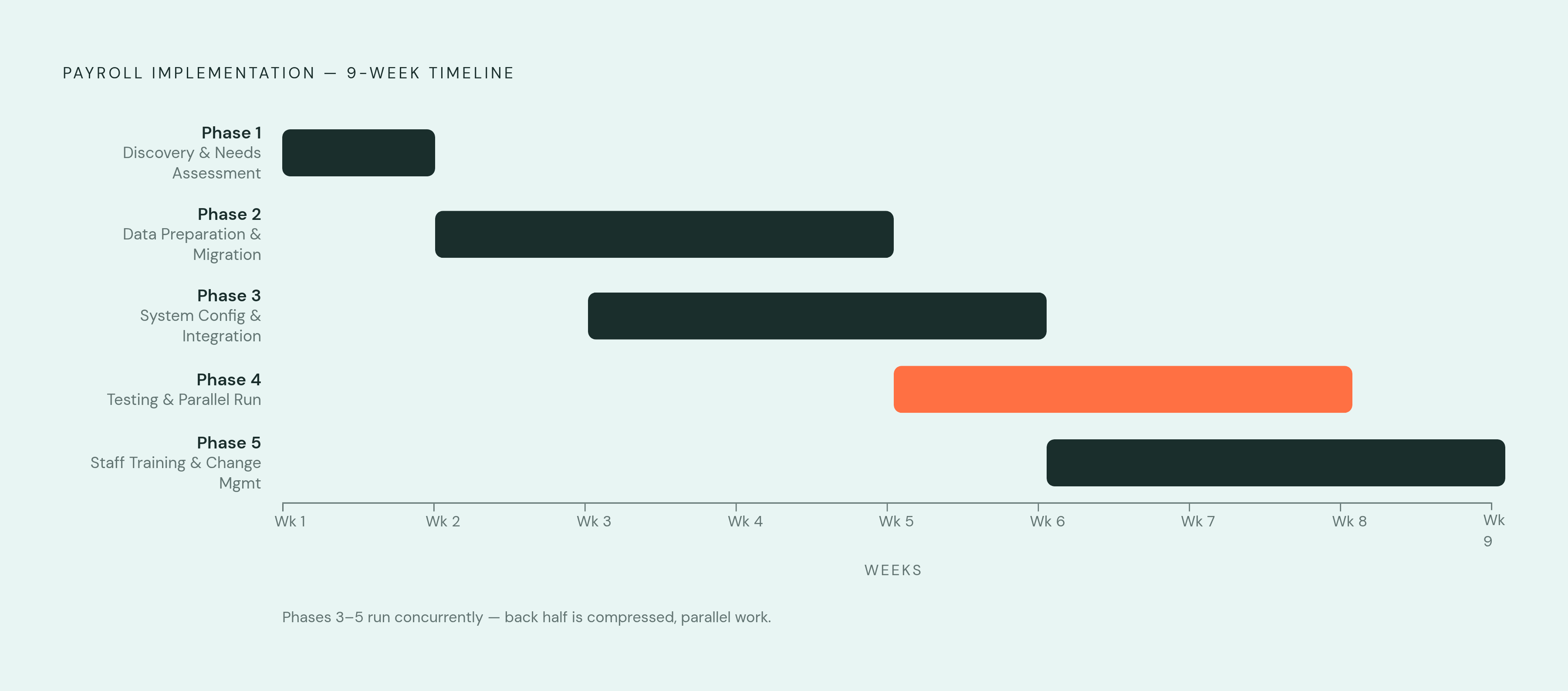
Phase 1: Discovery and needs assessment (weeks 1–2)
This phase usually runs one to two weeks, and it's where a company figures out what it's actually trying to fix. That means auditing the current system's failure points, including the reports that take too long to generate and the manual reconciliations payroll staff dread every cycle, and writing down goals that are specific rather than aspirational. Not "better compliance," but which compliance flags keep getting missed and why.
It's also when integration requirements get mapped against applicant tracking, ERP, time tracking, and benefits platforms, and when workforce complexity gets named out loud instead of assumed away. A company running international employees, tipped workers, part-timers, and multi-state filings side by side needs to identify all of that here. Finding it during configuration costs weeks.
Vendor selection follows its own sequence: internal alignment on requirements, shortlisting, evaluation, selection. Alignment is the step companies skip most often, and it shapes whether the shortlist makes any sense at all. The scope decision made in this phase, core payroll only versus a fully integrated HR and payroll build, determines almost everything about how long the rest of the project takes. Get this wrong and no amount of good execution downstream fixes it.
Phase 2: Data preparation and migration (weeks 2–5)
Everything moves here: employee personal information, payroll history, benefits records, tax IDs, deduction codes, all of it shifting from the old system into the new HRIS. Industry studies put the share of data migration projects that run into delays or exceed budgets at around 60%, and payroll implementations concentrate that risk in this exact phase, because the data doesn't just need to move. It needs to be correct when it lands.
Data scrubbing isn't optional, even though it's tempting to treat it as paperwork. Records need checking for missing social security numbers, outdated addresses, and expired work authorizations before anything gets migrated. Skipping that step means the new system's automation just automates the errors faster and at a bigger scale. It just automates the errors faster and at a bigger scale.
Legacy systems are the biggest variable in this phase, and the pattern is consistent enough to call a rule: a business with payroll data scattered across three or four disconnected platforms, some updated regularly and some not, will watch a projected four-week data phase become eight. A business with payroll data scattered across three or four disconnected platforms, some updated regularly and some not, will predictably watch a projected four-week data phase become eight. It's usually the first honest signal that the company never had clean data to begin with, and the implementation just exposed a problem that predates the new vendor entirely.
Phase 3: System configuration and integration setup (weeks 3–6)
Configuration is the mechanical heart of implementation: payroll codes, benefit and deduction codes, employee HR records, timesheet rules, compensation bands, org structure, and headcount forecasting modules all get built out here. Then comes the harder task, connecting all of it to the systems already running the business: accounting software, equity platforms, time tracking tools, benefits administration.
Every connection needs its own mapping, its own testing, its own sign-off before payroll can run cleanly on top of it. Integration scope multiplies effort instead of adding to it in a straight line. Vendors don't always make this easier. Data migration paths get left deliberately vague on the vendor side more often than buyers expect, and working directly with product specialists, not the sales team that closed the deal, is what actually produces clean exception handling instead of weeks of back-and-forth over edge cases.
Integrated HR-payroll platforms are projected to account for 49.0% of the product segment by 2026, and that number explains the demand for unified systems well enough. What it doesn't explain, and what the sales deck won't tell you, is that the same unification turns configuration into the longest phase of implementation for most businesses. A single connected platform looks simple in a demo. Building the wiring underneath it almost never is.
Phase 4: Testing and the parallel run (weeks 5–8)
Testing typically runs in multiple stages, covering individual components, connected systems, and user acceptance with the people who'll actually run payroll day to day. Skipping any one of these to save time is a false economy, because each stage catches a different category of error the others miss.
The parallel run is the phase that actually protects the business. Old and new systems run side by side for one or more payroll cycles, and matching outputs are the green light for go-live. A mismatch is useful information at this stage, not a crisis, but only if the schedule left room to chase it down properly. Compress the parallel run to save two weeks, and the discrepancy just moves from a controlled test into a live paycheck, where it costs a lot more to fix. It just moves from a controlled test into a live paycheck, where it costs a lot more to fix.
By 2026, go-live acceptance in a well-run implementation gets documented through a set of evidence spanning testing results, output comparisons, data reconciliation records, integration validation, and confirmed training and support readiness. Skipping the parallel run means that evidence simply doesn't exist. Acceptance in a mature implementation depends on accurate migration, working integrations, real testing, compliance checks, and clear ownership spread across HR, finance, IT, and the vendor, not on a go-live date picked because it looked good on the project plan.
Phase 5: Staff training and change management (weeks 6–9)
A payroll system is only as good as the person running it on a Tuesday afternoon with a deadline in two hours. Bad training doesn't just slow people down. It erodes confidence in the new system fast, and once staff start working around the software instead of through it, the implementation has failed in practice even if every technical box got checked on paper.
Training needs to cover full pay cycles, adjustments and exceptions (the messy cases that never fit the standard workflow), reading and interpreting reports, and self-service portals from the employee side. Timing matters as much as content here. Hands-on training that starts the week of go-live is too late. It needs to start earlier, ideally overlapping with the testing phase, so staff learn the system on real configurations instead of a generic demo environment.
Vendor-provided training materials are a starting point, nothing more. The real test is that staff can run the system inside the business's actual payroll setup, with its actual pay codes and its actual approval chains, under actual time pressure.
Go-live and the first live payroll cycle
Go-live doesn't mark the end of implementation. It marks the start of the system's proving period, and the businesses that treat it as a finish line are usually the ones fielding frantic calls a week later.
A well-prepared go-live has consistent markers: every acceptance criterion met, data reconciled, integrations validated, defects closed, training finished, ownership assigned clearly across HR, finance, IT, and the vendor, and a support escalation path confirmed before the first live cycle runs. Calendar timing plays a bigger role than most project plans give it credit for. Pushing go-live into the middle of a pay cycle creates partial-period complexity that didn't need to exist in the first place. Aligning go-live with the start of a new pay period, a new quarter, or the calendar year removes a whole category of reconciliation headaches before they start.
The first live cycle is the highest-stakes data point in the entire project. Discrepancies that appear here get caught quickly, but only if a monitoring plan was built in advance to catch them, rather than assembled after something has already gone wrong.
Post-implementation review and ongoing monitoring
The review that follows go-live asks a short list of direct questions. Did the system deliver on the goals set back in Phase 1? Do the integrations hold up under real payroll volume rather than test data? Are staff actually using the system as trained, or quietly building workarounds around it? Are compliance filings generating the way they're supposed to?
The system's ongoing value also appears here, in real-time reporting on labor costs against revenue, visibility into overtime patterns, and the ability to forecast payroll expense instead of guessing at it. AI-assisted features are common in 2026-era platforms, automating repetitive tasks, catching errors, giving employees faster access to their own information, surfacing trends in near real time. None of that delivers anything, though, until the underlying data and integrations are stable. AI layered on top of messy data just produces confident-looking mistakes faster than a person could make them.
Post-implementation is also when the invoice starts telling a different story than the sales proposal did. Among IT leaders, 79% reported a price increase at renewal within the past year, and 78% ran into unexpected charges tied to usage or AI feature add-ons. The sales process never discloses those numbers. The first renewal invoice reveals them, after the budget's already been set.
The real cost structure of payroll software and where budgets get surprised
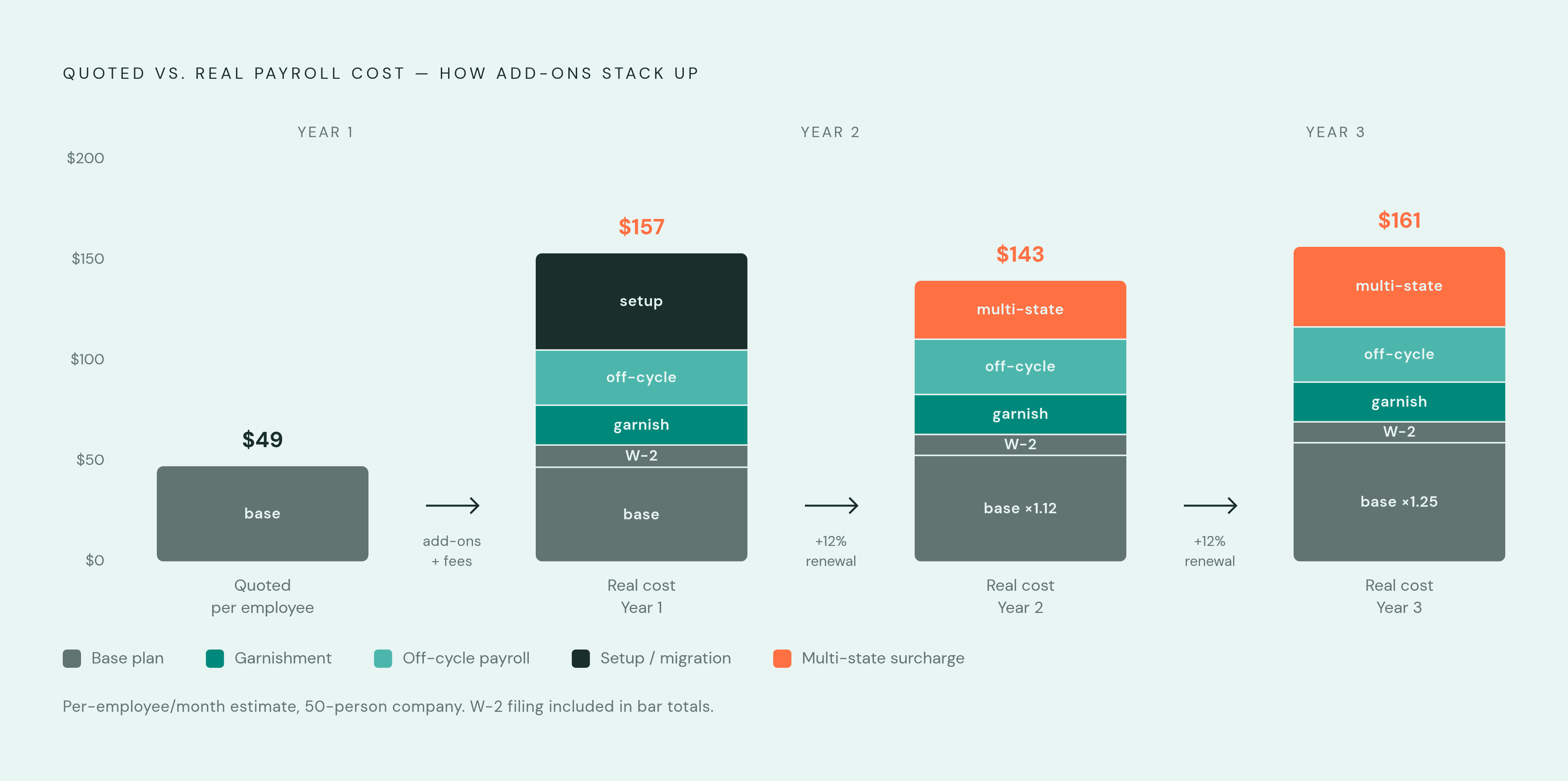
Entry-level payroll pricing in 2026 generally starts in the $29 to $49 range: OnPay lists around $36 plus $4 per employee, QuickBooks Payroll around $45 plus $5 per employee. Numbers like that look manageable on a spreadsheet, which is exactly the point of putting them on a spreadsheet.
Enterprise HCM platforms typically start between $1,200 and $1,500 a month, scaling with headcount and whatever else gets bundled in. Core HRIS plans often get advertised at $5 to $25 per employee, but that headline number rarely survives contact with implementation fees, unbundled modules, contractor seats, AI feature surcharges, and a renewal increase that runs around 12% a year for HRIS platforms. Stacked together over time, the real bill can grow substantially beyond the number on the original quote. That gap is the single most predictable line item in the entire budget, and the one companies plan for least.
The hidden costs repeat across vendors in the same predictable categories every time. Off-cycle payroll runs cost $10 to $75 each. Year-end W-2 and 1099 filing adds $3 to $20 per form. Garnishment processing runs $5 to $35 per month. Setup and data migration fees can reach $1,500 on their own, and multi-state payroll surcharges usually sit outside the base plan entirely, appearing on the bill only once a company actually needs them, which by then is too late to negotiate.
Sequencing implementation to avoid the most common failure modes
Every recurring failure in payroll implementation traces back to a specific phase, not to bad luck, and the sequence shapes how much damage any single decision inside it can do. Rushed data migration in Phase 2 shows up later as errors during the parallel run or, worse, during the first live cycle. Underestimated integration complexity in Phase 3 pushes configuration past the planned go-live date. A skipped or shortened parallel run in Phase 4 means live payroll errors with no baseline to diagnose them against. Training treated as a single event in Phase 5 turns into staff workarounds and reporting errors months after go-live. Hidden costs discovered after the contract is signed erode the ROI case that justified the project in the first place, no matter which phase surfaces them.
A few sequencing principles hold steady regardless of company size. Data scrubbing should start before vendor selection is even finalized, since data quality problems often reveal which system actually fits the business and which one just fit the sales pitch. Go-live dates should be set backward from a natural payroll calendar anchor, a new year, a new quarter, the start of a pay period, rather than forward from whenever the contract happened to close. And at least one full parallel run cycle needs to be a fixed, non-negotiable milestone that survives even when the schedule slips.
None of this is complicated in concept. It's just easy to skip under deadline pressure, and the businesses that skip it are the ones explaining a payroll penalty to the IRS, or explaining a missed paycheck to an employee who's already updating a resume.