OnPay vs Gusto for Budget-Conscious Small Businesses
OnPay keeps costs flat as you grow; Gusto doubles per-person rates when you hire across state lines.

- Written by
- Payroll Picks Editors
- Updated
- October 25, 2026
- Reading time
- 8 min read
- Sources cited
- 3 sources ↓
What this covers
OnPay and Gusto both start at $49 a month plus $6 per person now, after Gusto raised its Simple plan base from $40 on March 1, 2026. That tie kills off the easy version of this comparison, but it exposes the real question. For a budget-conscious small business, the platform that costs less today isn't the one that matters. What matters is which platform avoids a tier jump six months out, once the business adds a state, a remote hire, or an HR need it didn't have at signup. Gusto is the one waiting to spring that trap.
How each platform's pricing architecture actually works
OnPay runs one plan. For $49 a month plus $6 per person, a business gets full-service payroll, federal, state, and local tax filing, multi-state payroll, contractor payments, onboarding, reporting, and benefits administration, all under one roof. Want expanded HR features? That's a separate add-on at $15 a month plus $2 per worker, with additional HR support options available beyond the base add-on. The core payroll product doesn't change shape based on headcount or geography. One price, no surprises, that's the whole pitch.
Gusto works in three tiers instead. Simple runs $49 a month plus $6 per person, but it's US-only and single-state, a restriction that matters more than it sounds like at first glance. Plus jumps to $80 a month plus $12 per person, and that's where multi-state payroll and time tracking actually live. Premium tops out at $180 a month plus $22 per person for the full HR suite. Gusto also runs a Contractor Only plan, though that only helps businesses whose payroll needs center on contractor payments.
The real difference sits in what happens to the per-person rate once a business needs more than the base tier gives it. OnPay's optional HR add-ons can push its effective per-person cost above $6, but the core plan never forces an upgrade on anyone. Gusto's per-person rate simply doubles, from $6 to $12, the moment a business needs Plus, and that doubling hits every employee on the roster, not just whichever hire triggered it.
The single trigger that makes Gusto's pricing jump: a second state
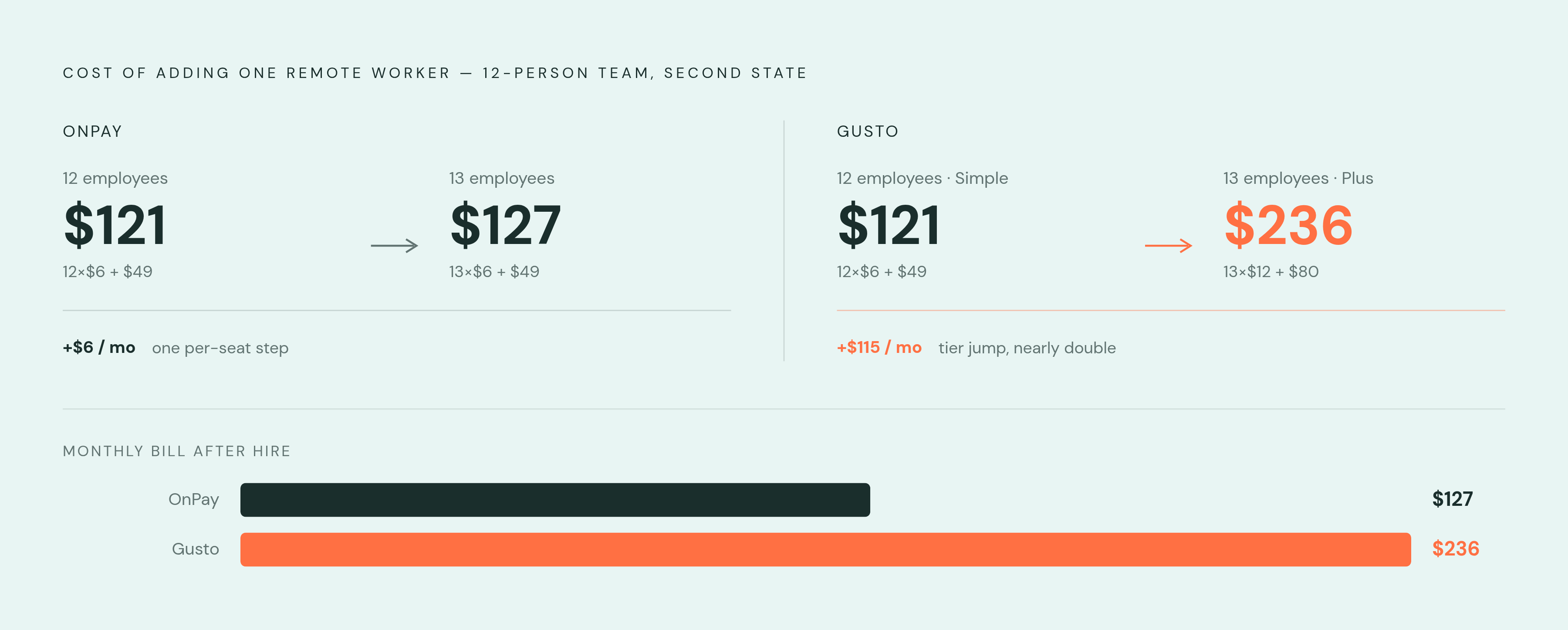
One variable decides more of this comparison than anything else: does the business pay someone in a second state?
OnPay includes multi-state payroll in its base plan, full stop, no asterisk. Gusto requires the Plus tier the moment a second state enters the picture, and Plus doesn't just tack on a flat fee. It doubles the per-person rate across the entire headcount, not just the new hire.
Run the math on a 12-person business that takes on one remote worker in a different state. On OnPay, the bill moves from $49 plus (12 × $6) to $49 plus (13 × $6), landing at $127 a month, one incremental $6 step. On Gusto, that same business has to move off Simple entirely. The bill becomes $80 plus (13 × $12), or $236 a month, nearly double what a 12-person Simple-tier customer was paying the month before.
The gap doesn't close after that hire, either. It widens. Every employee added after the tier jump costs $12 a month on Gusto against $6 on OnPay, so the two bills keep pulling apart with each new hire, and there's no ceiling on that spread.
This matters most for businesses where a second state isn't a hypothetical, it's close to inevitable at small headcount: nonprofits with remote program staff, restaurants running more than one location, agricultural operations with seasonal workers crossing state lines. These are exactly the segments where OnPay's pricing structure offers a clear advantage, with multi-state payroll included at no extra tier cost.
What's actually bundled at the base price on each platform
OnPay's base plan includes unlimited pay runs, same-day direct deposit, multi-state tax filing, new hire reporting, W-2 and 1099 filing, employee self-onboarding, a self-service portal, benefits administration, and QuickBooks or Xero integrations down to the employee level. What gets pushed to the HR add-on is narrower than it sounds: time-off management and certain HR tools. That's it.
Gusto Simple includes automated federal and state tax filings, unlimited pay runs, self-onboarding, document e-signing, contractor payments, and basic reporting. What Simple excludes matters more than what it includes: multi-state payroll, time tracking, PTO management, and custom offer letter templates (basic templates ship with Simple, custom ones don't).
OnPay emphasizes the reliability of its tax filings across federal, state, and local levels as a core part of its value proposition. Gusto counters with a wider integration bench spanning time tracking, expense management, and point-of-sale tools.
The base-price comparison splits cleanly along intent, then. A payroll-first business gets a more complete bundle from OnPay on day one. A business that wants a growth roadmap into deeper HR functionality gets that from Gusto's tier structure, but pays for it in stages, and should walk in knowing that going in.
Where Gusto's feature depth genuinely justifies the higher tier cost
Gusto serves a large base of US businesses, and that scale funds deeper feature development in areas OnPay hasn't fully matched.
Gusto has also shipped a ChatGPT integration, open to every customer for questions about payroll and HR, with actual payroll execution limited to select accounts so far. A user can ask about payroll and HR in plain language and get answers pulled from live Gusto data, no spreadsheet exports required. Running payroll from inside a ChatGPT conversation is described as a first step, with more capability expected to follow. For most accounts today, the tool reviews and analyzes; the actual payroll run still happens inside Gusto itself.
None of this matters to a single-location business planning to stay single-state. But for a company expecting to hire internationally, or one that wants AI-assisted payroll as a long-term direction, Gusto's higher tiers do work OnPay isn't built to do. That's the honest case for Gusto, and it's a narrower case than Gusto's own marketing suggests. Tripping into Plus by accident, because of one remote hire nobody planned for, is a penalty. Walking into Plus on purpose, already knowing what it buys, is a fair trade. Most small businesses fall into the first group, not the second.
How customer experience and support compare once the platform is live
On Capterra, OnPay holds a 4.8 out of 5 across 468 reviews. Gusto holds 4.6 out of 5 across 4,225 reviews. OnPay's edge shows up across every category that matters to a budget-conscious buyer: value for money (4.9 versus 4.5), functionality (4.7 versus 4.5), and customer service (OnPay rated higher versus Gusto's 4.4).
On G2, the same pattern holds: OnPay at 4.8, Gusto at 4.6. What makes OnPay's number more directly relevant here is who's leaving the reviews. OnPay's G2 reviewer base skews heavily toward small business, making its ratings especially relevant for small shops evaluating the platform. OnPay's ratings reflect the experience of businesses that look like the one reading this. Gusto's larger, more varied customer base pulls in complex operations alongside small ones, which is part of why the review pool runs so much bigger on Capterra, but also why it's less uniformly comparable to a small shop weighing its first payroll platform.
Hands-on onboarding help and responsive support are frequently cited as differentiators in OnPay user reviews. OnPay has picked up recognition beyond user reviews too: a top-rated placement in Capterra's Payroll Shortlist reports from 2023 through 2026, and Best Value Payroll Software for 2026. That's an outside party's verdict, not a line from OnPay's own copy.
None of this is abstract. A payroll error that takes three transfers to reach someone who can actually fix it costs a business something, even if the cost never shows up on the monthly invoice.
How accountants and bookkeepers should factor the partner programs into the platform decision
Both platforms court accountants with a dedicated partner dashboard and free payroll for the firm's own use, and the headline revenue-share numbers land close together: up to 20% for Gusto, up to 15% revenue share or a 20% client discount for OnPay.
Gusto Pro counts more than 23,000 accounting firms as users. It runs a tiered structure, Starter, Bronze, Silver, Gold, with perks that scale as a firm brings in more clients, plus visibility into Gusto's partner directory in front of its 500,000-plus small business base. Gusto claims the program saves firms roughly 200 hours a year on payroll, tax, and compliance work.
OnPay's partner program stays flat instead, matching the single-plan structure of the product itself. Partners choose whether OnPay bills clients directly, or the firm bills clients and either takes the revenue share or passes along the discount. Free CPE credits come with it, along with a Partner Dashboard that gives client-level permissions, deadline tracking, and the ability to log into a client's account and run payroll directly.
The practical difference comes down to who each program rewards. Gusto Pro's tiers reward volume and create an incentive to keep adding clients just to climb levels. OnPay's program is simpler to run day to day, better suited to a solo accountant or small firm that wants clean, bilateral billing without tracking tier progress. And the platform an accountant recommends shapes the conversation that follows: recommend Gusto, and be ready to explain the tier jumps before they surprise a client. Recommend OnPay, and the pricing conversation mostly stays where it started.
Which business profiles belong on each platform
OnPay fits best for a small team, roughly under 25 people, where payroll accuracy matters more than HR suite depth. It also fits any business with a real shot at hiring across state lines: remote staff, seasonal workers, multiple locations, since multi-state payroll never triggers a tier change there. Restaurants, nonprofits, and agricultural businesses get purpose-built features at no extra cost. For a buyer who wants a monthly bill that doesn't move without warning, or a business without an internal HR team to sort out a billing surprise, OnPay's flat structure removes that risk entirely. That's worth more than it sounds like on paper.
Gusto fits best for a business that's single-state and plans to stay that way, since Simple holds up indefinitely under those conditions. It also fits a business with international ambitions, global payroll or overseas contractor payments, or one that wants a single platform to grow into over years, adding benefits, deeper HR, and AI-assisted payroll tools as headcount and complexity increase. And for a business that leans hard on integrations, connecting payroll to time tracking, expense tools, and point-of-sale systems, Gusto's nearly 200-integration bench is hard to match.
The variable that decides most of this isn't the plan someone signs up for today. It's whether Plus becomes necessary within the next 12 to 18 months, and for most small businesses adding even one out-of-state hire, it will. If it does, the real comparison was never $49 against $49. It's OnPay's flat model against Gusto at an $80 base and $12 per person, a gap that only widens with every hire after it opens.
Neither platform is the wrong choice on its own terms, and both do what they claim to do. But don't ask which one looks cheaper this month. Ask which pricing architecture the business will grow into without friction, and which one is waiting to double the bill at the worst possible moment. For most small businesses reading this, that answer points at OnPay.
Methodology & sources
- Compare Gusto vs OnPay 2026 | Capterra
Provided the Capterra review counts and ratings for both platforms used in the customer experience section.
- Gusto vs OnPay 2026: Which Small-Business Payroll Software Actually Costs Less?
Supplied the specific pricing figures for Gusto's Plus and Premium tiers and OnPay's HR add-on costs used throughout the pricing section.
- Gusto vs. OnPay Comparison 2026 | G2
Provided the G2 ratings for both platforms cited in the customer experience comparison.