Best Payroll Software for Restaurants and Hourly Workers
Navigating tip credits, overtime rates, and compliance rules that don't fit generic payroll tools.
- Written by
- Payroll Picks Editors
- Updated
- October 12, 2026
- Reading time
- 11 min read
- Sources cited
- 1 sources ↓
What this covers
Restaurant payroll runs on tips, split shifts, and a workforce that turns over faster than the specials board. That combination breaks generic payroll software in specific, predictable ways, and this piece walks through exactly which features matter, why they matter, and which platforms actually handle them.
Restaurants make up one of the largest private-sector employers in the country, with 15.7 million jobs according to the National Restaurant Association. That scale means a small payroll error, one tip credit miscalculated across a chain, one overtime rate applied wrong, doesn't stay small. Labor is usually the single biggest cost lever an operator controls, typically running 25 to 35% of gross sales depending on the business model. Yet the 7shifts 2025 Restaurant Labor Cost & Profitability Survey, which polled 511 operators, found only 36% actually hit their labor cost targets. Forty-four percent spend more than planned. Some of that gap is menu pricing and staffing decisions. The rest, arguably a good chunk, is payroll infrastructure that wasn't built for the way restaurants actually pay people.
Four things make restaurant payroll different from, say, payroll at a law firm or a retail chain: tipped wages that require separate tracking from base pay, employees who work multiple roles at multiple pay rates, overtime math that has to account for those rate changes, and compliance rules that shift state by state, sometimes city by city. A payroll tool built for a nine-to-five office doesn't flex for any of this. It wasn't designed to. The buyer's real task is finding software that was built, or at least adapted, for this exact mess.
How tip handling actually works — and where payroll tools have to keep up
Start with the federal baseline, because everything else builds on it. Under the Fair Labor Standards Act, employers in most states can pay tipped employees a direct wage of $2.13 an hour, as long as tips bring total hourly earnings up to at least the $7.25 federal minimum. That's the tip credit. Payroll software has to check this math every single pay period, for every tipped employee, or the employer is on the hook for the shortfall.
From there it gets messier. Tip pooling has a hard rule: managers and supervisors cannot legally take a cut, and software needs to enforce that automatically rather than trust a manager to self-police. Cash tips and credit card tips carry different withholding treatment. Tip-outs, the server-to-busser or bartender distributions that happen at the end of a shift, need to be documented and rolled into W-2 wages. Auto-gratuities, the automatic gratuity tacked onto a table of ten, are legally wages, not tips. That distinction matters a lot for event venues and any restaurant with a large-party policy, because it changes how the money gets taxed and reported.
Then there's the 80/20 rule, which is still very much in motion. The Fifth Circuit struck it down for Texas, Louisiana, and Mississippi in 2025, which means operators in those states face a different standard than operators in, say, New York or California. Payroll software has to be flexible enough to apply the right rule to the right location, which is a genuinely annoying problem to solve in code if the platform wasn't built with multi-jurisdiction logic from day one.
Layer on top of that the "no tax on tips" provision under the One Big Beautiful Bill Act, signed July 4, 2025. Employees can now deduct up to $25,000 in qualified tip income from federal taxable income for a defined set of tax years. Sounds like a straightforward win for servers and bartenders. Operationally, though, it changes very little on the employer side and adds a new reporting burden. FICA withholding and remittance on tip income is still required; that obligation didn't move an inch. Payroll systems will have to separately track and report qualified tip income on W-2s, which is a new field, a new calculation, and a new place for a vendor's software to get it wrong. Separate tip reporting on the W-2 is shaping up to be a critical requirement for any payroll platform serving restaurants.
Worth flagging in the same breath: a companion "no tax on overtime" provision lets W-2 employees deduct up to $12,500 if single, or $25,000 if filing jointly, in qualified overtime pay through 2028. The deduction applies to qualifying overtime pay within the limits set by the provision. It's a nice line for the employee handbook. It's also one more calculation payroll software needs to get right without being asked twice.
Overtime, multi-rate pay, and the scheduling rules that ripple into payroll
Here's a scenario that happens constantly and trips up payroll software constantly: a line cook covers a supervisor shift on Tuesday, a server picks up a bar shift on Friday. Same person, two or three different hourly rates, all in one pay period. The math isn't exotic, but it has to be applied correctly to every single hour, and overtime makes it worse. When rates differ across roles, which rate governs the overtime premium? The FLSA has a specific method for this called the "weighted average," or regular rate calculation, and software that fudges it isn't just making an arithmetic error, it's creating real wage-and-hour liability that can surface years later in an audit.
Classification questions sit right next to this. The FLSA exempt salary threshold remains at $35,568 after a court struck down a proposed 2024 increase, so restaurant managers hovering near that number need careful review, and the salary figure alone doesn't settle the question; the duties test still applies on top of it. Get this wrong and a "salaried, exempt" assistant manager turns into a very expensive misclassification claim.
Predictive scheduling laws add a separate layer, now active in a growing list of states and cities. These typically require advance schedule notice and premium pay when the employer changes the schedule at the last minute. Some jurisdictions now also require pay range disclosures in job postings, which pulls recruiting into the same compliance conversation as payroll.
Here's the practical catch: if the payroll platform doesn't talk to the scheduling system, someone on the management team is manually calculating these premiums by hand, schedule change by schedule change. That's not just tedious. It's a direct compliance risk, because manual processes are where errors live.
What high turnover does to payroll operations at scale
Restaurant turnover runs 75 to 80% annually on average, roughly double the 47% national average across all industries, and quick-service restaurants blow past even that, topping 130% in some cases according to Paytronix. Read that number again. It means a restaurant with 50 employees is functionally replacing its entire staff, then some, every single year.
Every hire and every departure triggers a full payroll cycle. New hire: data entry, direct deposit setup, I-9 and W-4 collection, tax withholding configuration. Separation: final paycheck timing, which varies by state law, tip reconciliation for that final pay period, and eventually a W-2 at year-end for someone who may have left in March. At 75 to 80% turnover, that cycle isn't a once-a-year event. It's dozens of times a year, for the same 50-person restaurant, on repeat.
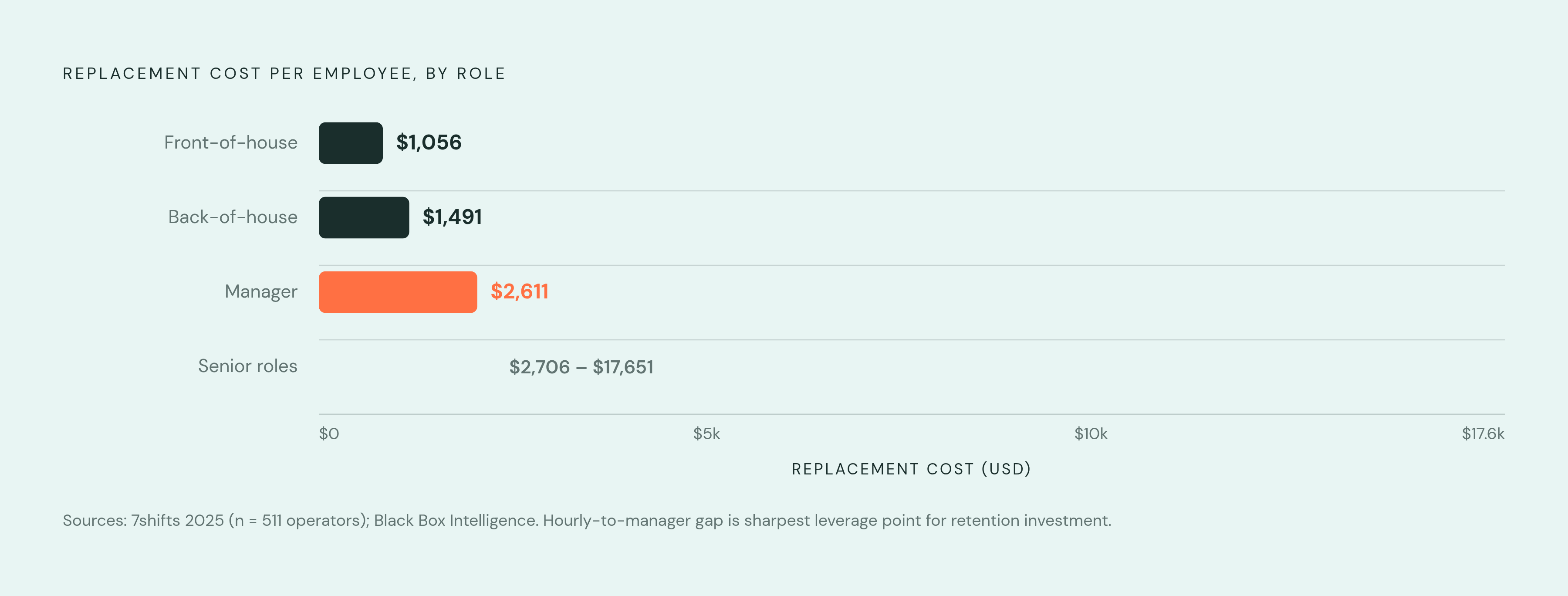
The cost of that churn is measurable, not theoretical. The 7shifts 2025 survey of 511 operators put replacement cost at $1,056 for a front-of-house employee, $1,491 for back-of-house, and $2,611 for a manager. Black Box Intelligence data runs the range even wider, from $2,706 up to $17,651 depending on role and seniority. Onboarding speed, then, is a direct line item, not a nice-to-have feature buried in a vendor's marketing deck. Self-service portals where a new hire sets up direct deposit and fills out a W-4 on a phone, mobile-first onboarding that gets someone to their first paycheck without a manager babysitting paperwork: these things save real money at this turnover rate, because time spent on admin is time and money the restaurant doesn't get back.
The feature checklist restaurants should use to evaluate any payroll platform
Start with POS and time-clock integration, because it's the single biggest lever for both accuracy and time saved. Hours, tips, and sales data should flow straight from the POS into payroll without anyone re-typing a number. According to Toast, integrated payroll tools can cut administrative payroll work by up to 4 hours per pay cycle compared to disconnected systems. Four hours, every two weeks, adds up over a year. Ask any vendor directly which POS systems they integrate with natively, versus which ones route through a third-party connector, because that connector is one more place for data to lag or drop.
Tip management needs to cover automated tip pooling with configurable distribution rules, tip credit verification against the minimum wage floor, and separate tracking of cash versus credit card tips. Starting with tax year 2026, the platform also needs to produce a W-2 that separately reports qualified tip income under the One Big Beautiful Bill Act; this is a near-term requirement, not a future nice-to-have.
Multi-rate pay and overtime handling: the system needs to assign multiple pay rates to one employee and apply the right rate to the right hours, then calculate overtime correctly when those rates vary within a single pay period.
Pre-submission error detection matters more than most buyers realize until they've missed it once. Real-time flags for missed punches, tip discrepancies, and overtime anomalies, before the payroll run gets finalized, catch mistakes when they're cheap to fix. Some platforms build this kind of automated pre-submission review directly into the payroll run rather than depending on someone reviewing a spreadsheet.
Multi-location and multi-state compliance rounds this out along with clean onboarding and offboarding workflows (digital paperwork, mobile access, automated final paychecks that hit state-mandated deadlines), scheduling integration for premium-pay calculations, and reporting that breaks labor cost down by location, role, and shift so overtime overruns get caught before they compound into a bad quarter.
How the leading platforms compare on these criteria
The comparison here focuses on restaurant-specific handling, an area where generic payroll platforms tend to fall short.
Toast Payroll fits best for operators already running Toast POS, since hours, tips, and payroll data sync natively with no connector in between. It handles tip payouts, multiple roles per employee, and rate changes within a pay period. Pricing sits on the higher end of the field. There's no free trial, which makes it harder to kick the tires before signing, and the cost sits on the higher end of the field. Best suited to Toast POS users who want one vendor for the whole stack rather than stitching pieces together.
Gusto shows up often in recommendations for independent and small-to-mid-size restaurants. It handles tipped wages, overtime, and multi-state tax filing, and its onboarding tools are strong, which matters given how often restaurants are onboarding someone new. Employees can set up direct deposit and W-4s from a phone. POS and scheduling integrations run through third-party connectors rather than a native sync, so it's a step removed from Toast's model. Good fit for independent operators who want solid HR-plus-payroll coverage without buying into a restaurant-specific ecosystem.
Paycombuilds each payroll run automatically and flags errors before submission: missed punches, tip mismatches, rate errors. That's genuinely useful in a high-volume hourly environment where a single missed punch can throw off a whole pay period. It handles multi-rate pay, overtime, and multi-location compliance well, with a strong self-service portal. The pricing tier and implementation lift tend to suit mid-size to larger restaurant groups better than a single independent location.
Paychex brings long-standing compliance infrastructure and dedicated support for tipped minimum wage complexity and state-by-state variation. It bundles HR, onboarding, and benefits alongside payroll, useful for operators trying to cut down on vendors. There's dedicated restaurant and hospitality guidance covering tipped wage rules, predictive scheduling premiums, and multi-state filing. Fits operators who want a human compliance advisor on the other end of the phone, alongside the software, especially across multiple states with different tipped-wage rules.
7shifts is primarily a scheduling and labor management platform, not a standalone payroll system, but it integrates with several payroll processors and feeds the labor cost visibility that payroll decisions depend on. It's strong on predictive scheduling compliance specifically, flagging premium-pay triggers before a schedule even gets published. Best thought of as the scheduling layer, paired with a separate dedicated payroll platform, rather than a replacement for one.
Rippling is a modular system that handles payroll, HR, benefits, and device management in one place, which matters for restaurant groups with a meaningful layer of salaried management sitting above the hourly staff. It supports multi-state, multi-location payroll with automated tax filing and multiple pay rates per employee. It's less purpose-built for tip management specifically than Toast or the hospitality-first platforms, but it's competitive on compliance automation and general workforce management breadth. Fits growing restaurant groups that want one system covering everyone from the dishwasher to the regional manager.
Questions to ask before committing to a platform
Does the platform integrate natively with the POS in use, or does it route through a connector that adds a lag, or a failure point, somewhere in the middle?
How does it handle an employee working two roles at two rates in the same week? Ask to see the actual overtime calculation, not just a description of it.
Can it generate a W-2 that separately reports qualified tip income starting with tax year 2026, and does the vendor have an actual documented plan for the One Big Beautiful Bill Act's new reporting requirement, or just a vague assurance that it's "on the roadmap"?
For multi-state operators: does the tipped minimum wage and overtime rule get applied automatically per jurisdiction, or is someone on staff configuring that by hand for every location?
What happens when a new hourly employee starts in three days? How fast can that person be set up for direct deposit and see a first paycheck without a manager chasing paperwork?
Does the system catch errors before the payroll run submits, or only after, when the fix means an off-cycle correction?
What's the real total cost at current headcount, and how does that number move as locations or seasonal staff get added?
And for anyone running more than one location: can reporting roll up across the whole group while still letting each location manage its own payroll day to day?
None of these questions have a universally right answer. The right platform depends on whether the business runs one location or twelve, whether it's already locked into a specific POS, and how much appetite there is for stitching separate tools together versus paying more for one vendor that does most of it natively. What's not optional is asking the questions before the contract gets signed, because untangling a bad payroll platform after the fact costs a lot more than the extra hour it takes to ask a vendor to walk through a multi-rate overtime example on the sales call.
Methodology & sources
- https://gusto.com/resources/guides/best-restaurant-payroll-software
Provided the labor cost benchmark of 25 to 35% of gross sales used in the opening section.