Best Payroll Software for Construction and Field Service Companies
Construction payroll has unique compliance risks that generic software cannot handle.
- Written by
- Payroll Picks Editors
- Updated
- October 19, 2026
- Reading time
- 10 min read
- Sources cited
- 5 sources ↓
What this covers
Construction payroll runs on a different rulebook than payroll anywhere else, and most off-the-shelf software was never written to follow it. This piece walks through why: the compliance exposure, the specific tasks payroll staff say keep them up at night, and how to actually pick a platform that fits a contractor's real workforce instead of the tidy one that shows up in a sales demo.
The compliance stakes construction companies are actually exposed to
Start with a number that should get any contractor's attention: the Department of Labor's Wage and Hour Division recovered over $274 million for workers in fiscal year 2024, and closed more than 17,000 wage and hour cases against employers over that same stretch. Construction has consistently been a high-priority enforcement industry for the Division, and some of the steepest penalties in that pile landed on construction firms specifically. This pattern traces back to how the industry is structured, with layers of subcontractors and job sites that shift by the week.
One case makes the abstract number concrete. A California contractor got ordered to pay $468,505 in back wages and damages to 137 workers after a federal investigation turned up minimum wage, overtime, and retaliation violations. That works out to roughly $3,400 per worker on average, and it came bundled with a federal investigation, legal fees, and the kind of reputational hit that shows up the next time the company bids a job.
On public projects the exposure runs deeper than back wages. A single miscalculation on a government-funded job can trigger penalties and debarment, meaning the company gets locked out of bidding on future public contracts entirely. Here's the asymmetry worth sitting with: a fine costs a quarter's earnings, but debarment costs years of work. Nobody budgets for the second one.
The ground shifted again at the start of this year. Updated federal certified payroll requirements have stacked on top of state enforcement that's gotten more aggressive. Risk concentrates hardest in the heavily subcontracted layers of the industry: general contractors set the terms, but smaller subs carry the actual payroll liability, and that's exactly where worker misclassification slips through the cracks. Payroll software on public work functions as a compliance control, similar in kind to a safety inspection or a bonding requirement, and treating it as anything less increases the odds a company ends up as next year's case study.
What payroll professionals in construction say is hardest to get right
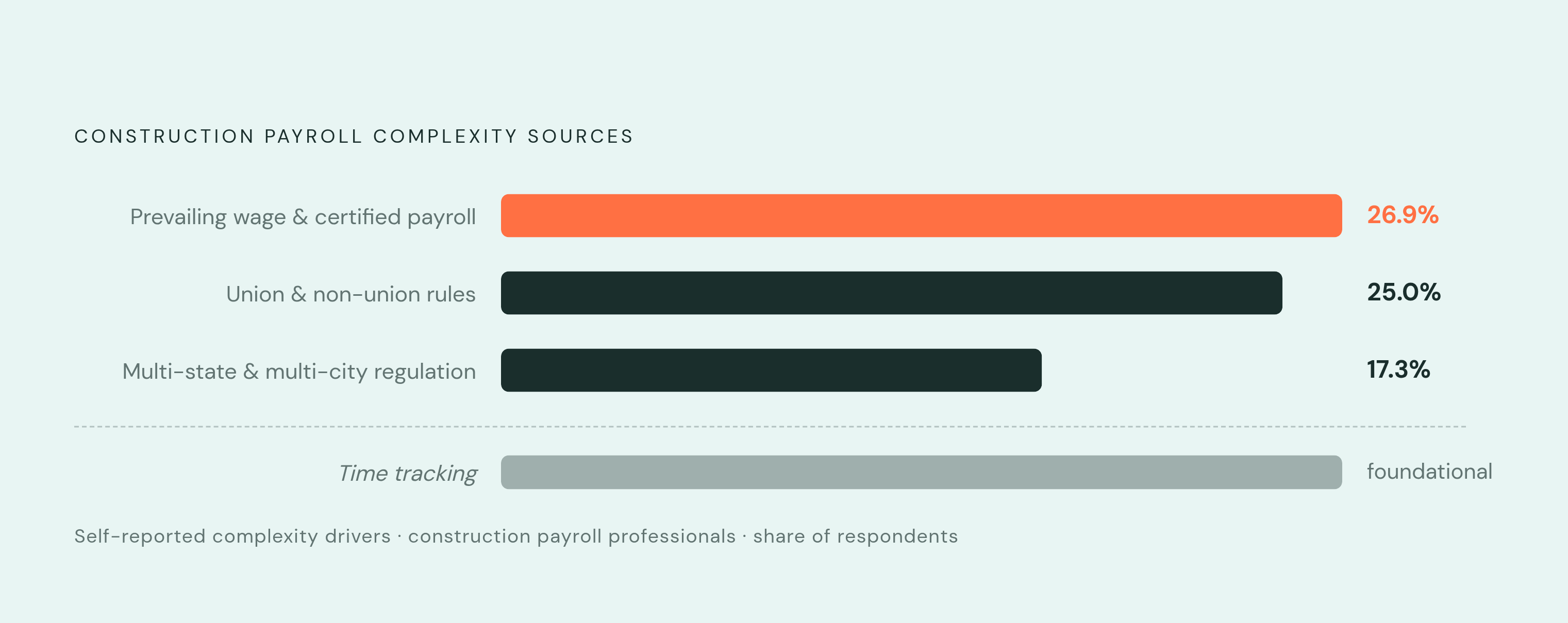
Ask payroll staff in construction what actually creates the most stress, and the answers cluster hard around a few specific tasks. Prevailing wage and certified payroll compliance tops the list: 26.9% of payroll professionals in construction name it as the single most complex part of the job, ahead of everything else measured. Union and non-union rules come in close behind at 25%, unsurprising given how much those rules vary by jurisdiction and by whatever collective bargaining agreement happens to govern a given crew that week.
Multi-state and multi-city regulation lands third at 17.3%. Picture a worker who starts a shift in one state and finishes it in another, or a crew that moves between city limits mid-week. Overtime rules, tax filing obligations, and wage floors can all shift depending on where someone was physically standing during a given hour, and payroll has to track that in real time, not reconstruct it later from memory and a timesheet.
Time tracking is the operational sore spot sitting underneath all three of those numbers. Getting accurate hours off a remote job site, tying those hours to the right job and phase, then keeping records clean enough to survive a certified payroll audit or a union reporting request: each step is demanding on its own, and skipping any one of them carries a dollar figure or a legal exposure attached. Get the hours wrong and one of two things happens: a compliance violation follows, or the job-costing numbers go soft enough to distort a project's budget. The feature list in the next section maps directly onto these pain points, and that connection traces back to the specific tasks payroll staff in this industry actually name when asked what breaks.
The features that actually matter when evaluating construction payroll software
Certified payroll automation should be the first filter, not the last checkbox. It's the single biggest reported pain point, so any platform evaluation should start there and cut anything that fails this test before looking at pricing. That means automatic generation of federal Form WH-347 and whatever state-specific equivalents apply, complete with statements of compliance, plus a built-in prevailing wage rate database that applies the correct pay automatically based on project location and worker classification. A manual lookup table, in 2025, is a red flag disguised as a feature.
Multi-rate and overtime logic comes next, and this is where a lot of standard payroll tools quietly fail. A single worker can earn one rate on framing and a different rate on electrical within the same week, and the system has to switch rates by cost code without a person stepping in every time. Overtime compounds the problem: rules differ by state, by union contract, and sometimes by day of the week, so the software needs rule sets flexible enough to handle all of it without a spreadsheet patched on the side.
Union and CBA configuration matters just as much, particularly for firms running mixed crews. The platform needs to handle multiple union agreements, each with its own wage scale and fringe benefit contribution schedule, and it needs to run union and non-union workers through the same payroll cycle without someone reconciling the difference by hand afterward.
Job costing integration is where payroll accuracy and project profitability actually meet. Every labor dollar has to tie back to a specific job, phase, and cost code, not just so the payroll number is right, but so a project manager can look at a dashboard and know whether the job is making money. When payroll and job costing live in two separate systems, double entry becomes inevitable, and that gap is exactly where financial visibility falls apart.
Mobile time capture with GPS or geofencing addresses the field-conditions problem head-on. Digital clock-in tied to location cuts down both time fraud and the lag of someone re-typing numbers from paper timesheets into a second system later. Hours captured in the field should flow straight into payroll and job costing, with nobody touching them twice.
Round it out with multi-jurisdictional tax filing, critical for crews crossing state lines mid-week, flexible pay group configuration since field crews often get paid weekly while office staff run biweekly or semi-monthly, and either a single-database ERP connection or a documented, reliable API into whatever construction accounting system the firm already runs.
Construction-native platforms built around these requirements
Foundation Software, through its Payroll4Construction product, was built for contractors from the ground up. Certified payroll, prevailing wage, multi-state work, and union reporting all run natively inside the same system as job costing and the chart of accounts, and it generates WH-347 and state-specific certified payroll forms. It offers over 40 reporting options for job-based labor summaries and compliance exports. Firms already on Foundation's ERP, or looking for construction accounting bundled tightly with payroll, fit here well.
CMiC is built so that payroll and project financials are tightly integrated; labor costs flow into job costing and the general ledger without re-entry. It also handles multiple pay rates by cost code within a single pay period. Mid-to-large general contractors and specialty subs looking for payroll, project financials, and HR under one construction-native roof tend to land here.
Lumber Payroll is built specifically for construction, handling union payroll, prevailing wage, and certified payroll natively, with an architecture meant to scale from small specialty contractors up through large multi-state operations.
Miter is a newer entrant to the space that unifies payroll, compliance, HR, and job costing in one system, automating Davis-Bacon and prevailing wage reporting all the way through to mobile field entry. It includes direct deposit and automated multi-state tax filings. The trade-off is track record: fewer user reviews exist compared to the more established names here, so confirming support depth before signing matters even if the feature checklist looks complete on paper.
Sage offers multiple paths depending on what a firm already runs, with construction-focused payroll options that vary based on which Sage accounting product is already in place. Fit here depends almost entirely on which Sage product a company already has in place, which makes this less a feature decision than an inventory question.
Viewpoint Spectrum is a cloud-based construction accounting suite covering job costing, payroll, billing, document management, and real-time dashboards. Its integration list stands out in particular, connecting with a range of field management and analytics tools, which matters for firms with systems already in place that they have no intention of ripping out.
General payroll platforms with meaningful construction capability
General payroll platforms, the ADPs and Gustos and QuickBooks Payrolls and Rippling and Paychex of the world, cover a lot of ground for a lot of businesses: multi-state tax filing, direct deposit, basic compliance features that handle standard payroll needs just fine.
Construction is where the cracks show. For any contractor doing certified payroll work, these platforms tend to fall short no matter how good the pricing looks. Certified payroll and WH-347 generation are often missing entirely, bolted on as an add-on, or dependent on a third-party integration that adds another point of failure. Union fringe benefit automation and CBA configuration tend to be limited or absent outright. Job costing integration usually requires a separate construction accounting system plus a sync layer, which reintroduces the exact manual-transfer risk described two sections back, the one that turns a project budget into guesswork.
There are situations where a general platform is genuinely enough, and it's worth saying so plainly. Small field service companies with no government contract work, no union labor, and crews that stay within one state don't need complexity they'll never touch. Some companies split the difference: running day-to-day payroll on a general platform while handing certified payroll submissions on specific projects to a specialist like Payroll4Construction.
The honest trade-off is cost versus workaround. General platforms are usually cheaper and faster to get running, but the manual patches needed to bolt on construction compliance eat into both of those advantages the longer a company runs on them. Netchex is worth a mention here too: it's a general-market platform that has built out construction-specific configurations, and it's worth a look for mid-sized contractors who aren't sitting on a full construction ERP and don't want one yet.
How to match a platform to your company's actual situation
Start with one question, because it should disqualify half the market on its own: does the company do government-funded work that requires certified payroll? If yes, any platform that doesn't natively automate WH-347 generation is off the list, no matter how the pricing looks on a spreadsheet. This is a filter worth applying before anything else.
Second, check union exposure. A company running union and non-union crews under multiple collective bargaining agreements is almost always better served by a construction-native platform with real CBA configuration. General platforms generate so many manual workarounds here that whatever the company saved on the subscription gets spent twice over in administrative time.
Third, look at multi-state reach. Crews that regularly cross state lines need automated multi-jurisdictional tax filing and state-specific overtime handling built in, not sold as a paid add-on and definitely not left to a spreadsheet somebody maintains between other jobs.
Fourth, consider what accounting system is already running underneath everything. A company already on Foundation, Sage 300 CRE, or Viewpoint should stay inside that ecosystem or pick a platform with a documented, reliable integration into it. Companies without a construction ERP need to treat the job costing question as the deciding factor: a platform that forces double entry into job costing is working against the exact problem it was bought to solve.
Finally, weigh company size against where the company is headed. Smaller specialty contractors with a simple compliance profile can often start on a capable general platform and layer in a specialist tool for certified payroll as needed. Firms scaling toward bigger government contracts or multi-state operations are better off investing in a construction-native platform before compliance complexity outpaces whatever system they've patched together to survive this year.
Before signing anything, run a short due diligence pass. Ask the vendor for a live demo generating a certified payroll report off a real project scenario with split rates, not a canned example built to make the software look good. Confirm whether prevailing wage rate tables get maintained and updated by the vendor itself, rather than left to internal staff to hunt down every time a rate changes. Ask exactly how the system calculates overtime when an employee logs hours in two states in the same week. And check whether mobile time capture connects natively or needs a third-party sync layer bolted on after the fact. The answers to those four questions tend to reveal, fairly quickly, whether a platform was built for this industry or adapted to it once the sales team realized construction was where the money was.
Methodology & sources
- https://www.hh2.com/construction-human-resources/construction-payroll-compliance-guide
Supplied the DOL Wage and Hour Division enforcement statistics including the $274 million recovered and 17,000 cases closed in fiscal year 2024.
- https://netchex.com/blog/best-payroll-software-construction-companies-2026/
Provided context for Netchex as a general-market platform with construction-specific configurations for mid-sized contractors.
- https://www.constructionowners.com/news/payroll-pitfalls-the-shocking-cost-of-construction-wage-violations
Provided the survey data on payroll complexity sources, including the 26.9% citing prevailing wage, 25% citing union rules, and 17.3% citing multi-state regulation.
- https://www.payroll4construction.com/
Informed the description of Foundation Software's Payroll4Construction product as a construction-native platform with certified payroll and prevailing wage capabilities.
- https://www.sage.com/en-us/sage-construction/payroll/
Informed the description of Sage's construction-focused payroll options and their dependency on which Sage accounting product is already in place.