Best Free Payroll Software for Startups and Solo Founders
Only three fully free payroll tools exist; most others hide paid tiers.

- Written by
- Payroll Picks Editors
- Updated
- October 19, 2026
- Reading time
- 10 min read
- Sources cited
- 4 sources ↓
What this covers
Free payroll software exists in exactly three flavors, and most comparison guides mash them together like it doesn't matter. It matters a lot: a tool that's genuinely free forever behaves nothing like a freemium plan that dangles free scheduling to sell you payroll later, which behaves nothing like a 30-day trial dressed up as a long-term option. Per Toolradar's analysis of 66 payroll tools, only three are fully free with no paid tier at all, and just one in five offer any free or freemium option whatsoever. That scarcity is the first thing worth understanding before anyone starts comparing feature lists.
What none of these tools do, free or paid, is take the compliance work off a founder's plate. Tax deposits still need to happen on time. Forms still need filing. Deadlines still need tracking, and mistakes still need correcting. A free plan can serve a two-person startup just fine for a while, then quietly stop being enough the moment the team crosses a state line or hires its first W-2 employee. The question worth asking isn't "is it free?" It's "what does free actually cover at the stage I'm at right now?"
The compliance stakes that make the wrong free choice costly
Penalties for payroll mistakes aren't rare edge cases reserved for careless owners. The Department of Labor recovers hundreds of millions of dollars in back wages for hundreds of thousands of workers each year, which gives some sense of how often payroll goes wrong even at companies that presumably thought they had it handled.
The IRS backs that up with its own math. Information-return penalties scale up significantly for late or incorrect filings, and climb further still if the IRS decides the disregard was intentional. Miss a tax deposit deadline, and the penalty climbs the longer the payment sits unmade, compounding the original shortfall significantly.
Worker misclassification is where free tools tend to bite hardest. A startup adds a contractor, then another, then decides one of them is really doing employee work, and nobody goes back to review the classification rules before running the next payroll cycle. Worker misclassification is widely documented as affecting a substantial share of employers across industries. None of the free tools in this guide flag that risk. They calculate what a founder tells them to calculate; they don't ask whether the underlying classification was right in the first place.
Add in the regulatory direction for 2026: e-filing thresholds are dropping, and more small employers are getting pulled into mandatory electronic filing for the first time, whether they feel ready or not. Free software saves the subscription fee. It never saves the compliance work, and when that work slips, the penalties stack up faster than any software bill ever could.
Payroll4Free covers payroll calculations, tax forms, time tracking, pay stubs, and an employee portal for free, up to 25 employees. It runs on Windows, shows ads in the free tier, and offers two optional add-ons: tax filing and direct deposit, each available for an additional monthly fee. Skip the tax-filing add-on, and every federal and state deposit deadline becomes the founder's personal responsibility. That's a fine trade if there's an accountant on staff keeping track of dates. Without one, it's a bet against the calendar. Best suited to US-based micro-businesses under 25 employees with straightforward pay structures.
It covers unlimited payroll processing plus PTO tracking, leave management, a time clock, attendance tracking, and expense claims, which is a genuinely wide feature set for a tool with a price tag of zero. The interface looks like it hasn't been touched since payroll software still came on a CD, but the functionality underneath holds up. Founders who need free, uncapped payroll and can live with a dated screen will find plenty here.
ExcelPayroll skips the cloud entirely: it's a payroll workbook that runs offline on a PC, calculating wages, deductions, and taxes while printing W-2s, 1099s, 940s, and 941s. There's no vendor relationship to manage and no data leaving the machine, which appeals to founders who already run half their operation out of spreadsheets anyway. It's the payroll equivalent of doing your own taxes with a paper form: slower, but nobody's watching over your shoulder.
None of these three offer real compliance guardrails, automatic tax filing (without an add-on), or an audit trail. The founder is the compliance department, full stop.
Freemium tools that bundle free adjacent features with paid payroll: Wave and Homebase
Wave changed its structure in January 2024. The free Starter tier still exists for manual bookkeeping, but automated bank imports and collaborator access now sit behind the paid Pro plan, at $19 a month or $190 a year. Payroll itself was never part of the free tier. It's a separate add-on priced at $40 a month plus $6 per active employee or contractor, so a five-person team lands around $70 a month before the accounting plan is even factored in.
What that money buys: tight integration with Wave's invoicing and accounting tools, automatic tax filing at the federal and state levels, and free unlimited direct deposits, backed by the filing depth that comes from Wave's relationship with H&R Block. What it doesn't buy: any coverage outside the US and Canada, benefits administration, PTO management, or a native mobile app for running payroll on the go. It fits founders already living inside Wave's ecosystem who'd rather add payroll than switch platforms entirely, not founders hunting for something free.
Homebase takes the opposite entry point. Scheduling and time tracking are free for one location, genuinely free, no asterisk. Payroll is the paid layer on top, available for an additional monthly fee per employee. It's built specifically around hourly teams, converting timesheets into regular hours, overtime, and break time, then syncing that straight into payroll so nobody's retyping numbers by hand. The catch is the location-based pricing: one site is free, a second site isn't. Salaried-only teams or startups running multiple locations on a tight budget won't get much value here, but single-location shops with hourly staff get real free tools now, with payroll available to bolt on whenever it's needed.
Free filing tools for contractor-heavy startups: TaxBandits and the IRS IRIS portal
TaxBandits offers free, unlimited payroll processing for both W-2 employees and 1099 contractors, which sounds almost too generous until the actual filing costs show up. Filing runs on a pay-per-form model: $0.70 to $2.75 per form, dropping to $0.80 a form once volume hits 501 to 1,000 forms. It also throws in a free W-9 Manager that collects unlimited W-9 and W-8 forms with AI-assisted data extraction, plus a free Contractor Portal where contractors can pull their own pay stubs and payment history without emailing the founder every February. It plugs into QuickBooks, Xero, Sage Intacct, Zoho Books, and FreshBooks, and supports every major 1099 variant. Good fit for startups juggling multiple contractors who'd rather pay per form than commit to a flat monthly bill.
The IRS IRIS portal is the one option on this entire list with no paid tier hiding anywhere, ever. It's free, period. That comes with a narrow scope by design: IRIS generates and submits 1099 forms only. No payment processing, no W-9 collection, no contractor management of any kind. Founders file through the Taxpayer Portal (up to 100 forms per upload) or through the A2A method for bulk filing, which handles uploads up to 100 MB and can process thousands of forms in one go. The IRS typically acknowledges submissions within 24 to 48 hours. W-9 collection has to happen somewhere else first, since IRIS won't do it. For a founder who only needs to file 1099s and already has contractor paperwork sorted, there's no cheaper or simpler way to get it done.
How payroll needs shift as the team grows past the free tier
At one to five people, the requirements stay simple: basic payroll, contractor payments, and automated tax filing cover most of what a startup actually needs. Free tools can carry this stage, provided the founder is willing to personally track every deadline.
Somewhere between five and 20 people, the math changes fast, usually because of geography. Per Warp's internal data, a majority of companies now have at least one employee working in a different state than headquarters. Free tools rarely handle multi-state registration or filing, which turns what used to be a one-state problem into a compliance puzzle with new rules for every new zip code on the team.
Past 20 people, benefits administration, HR workflows, structured time tracking, and real compliance guardrails stop being nice-to-haves. None of the free tools covered here handle that layer with any real depth.
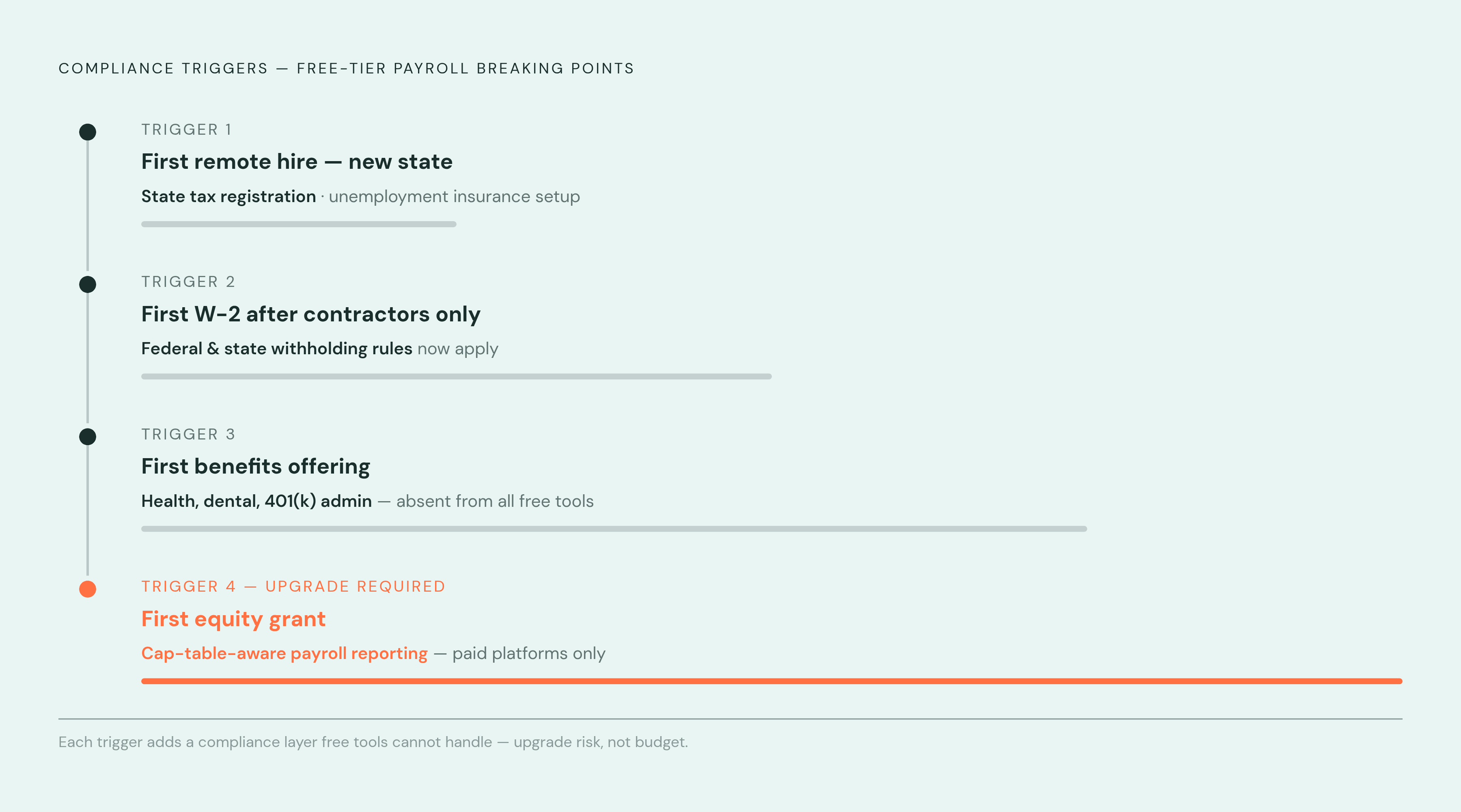
A few specific moments tend to break the free-tier model outright: the first remote hire in a new state, which triggers state tax registration and unemployment insurance setup that no free tool automates; the first W-2 employee after a run of contractor-only hiring, which brings withholding rules into play for the first time; the first benefits offering, since health, dental, and 401(k) administration appear in exactly zero of the free tools discussed here; and the first equity grant, which needs cap-table-aware payroll reporting that only paid platforms provide. The upgrade decision, in the end, has less to do with hitting some dollar figure in the budget and more to do with the compliance risk simply outgrowing what one person can track by hand.
Low-cost paid options worth considering when free stops being enough
Patriot Payroll runs Basic Payroll at $17 a month plus $4 per employee, or Full Service (federal and state filings handled) at $37 a month plus $4 per employee. It's the cheapest full-service option for small US teams, though the HR features stay thin.
OnPay charges one flat structure: $49 a month plus $6 per person, covering multi-state payroll, unlimited pay runs, and W-2 and 1099 workers billed at the same per-person rate, with benefits administration available in all 50 states. An HR module adds $15 a month plus $2 per person. OnPay consistently draws strong user ratings across major software review platforms. It has fewer integrations than some larger competitors and no international payroll, but for US startups wanting multi-state coverage and benefits admin at the lowest full-service price point, it's hard to beat on paper.
Gusto scales across four tiers: Simple at $49 a month plus $6 per person for single-state teams, Plus at $80 a month plus $12 per person once multi-state and advanced HR come into play, Premium at $180 a month plus $22 per person, and a contractor-only plan at $35 plus $6 per contractor. Over 500,000 businesses run on Gusto, and it connects to more than 180 other tools, including QuickBooks and Xero. It also handles equity taxation guidance and founder draws, which matters for startups with real cap-table complexity, and it can pay contractors in more than 120 countries (contractor payments only, not full international employment). Startups planning to hire remote across state lines should probably budget for the Plus tier from the start rather than starting on Simple and upgrading mid-year.
Rippling prices payroll around $8 per person per month on top of a platform fee ($35 base plus $8 per employee), and total cost climbs from there depending on which add-on modules get switched on. Once onboarding data is loaded, payroll runs in about 90 seconds, and global payroll or employer-of-record coverage is available across more than 160 countries, and the platform connects through more than 500 integrations. It fits best for startups that have grown past the early micro-team stage and want payroll, device management, and app provisioning running through one system instead of three.
Deel splits into contractor management at $49 per contractor per month with localized contracts across more than 150 countries, employer-of-record service at $599 per employee per month (with employer taxes and statutory benefits adding another 13% to 40% on top of gross pay, depending on the country), and US payroll running an estimated $19 to $24 per employee per month. It makes the most sense once a meaningful chunk of the team sits outside the US.
Warp starts at $89 a month plus $35 per person and handles automated state tax registration across all 50 states, along with contractor payments in more than 200 countries. It suits lean startups that want multi-state compliance handled without doing the registration paperwork by hand.
One more thing worth checking before locking in any platform: early-stage startups may be able to offset up to $500,000 a year in payroll taxes through the R&D payroll tax credit. Not every platform files this credit automatically, so it's worth confirming eligibility and filing support before choosing based on price alone.
How to choose based on your actual situation right now
The choice comes down to headcount, geography, and how much bandwidth a founder actually has to babysit tax deadlines. That's the whole framework: everything else is detail.
A solo founder with a couple of contractors and no W-2 employees yet can run entirely on IRIS for 1099 filing and either ExcelPayroll or Payroll4Free for the underlying calculations, spending nothing but time. Once that same team adds a remote hire in a second state, the free tools start showing cracks, and Patriot or OnPay become the more sensible move, since multi-state filing is exactly what they're built to absorb.
Teams already living inside Wave for invoicing, or inside Homebase for scheduling hourly staff, get real value from staying put and adding the payroll add-on rather than migrating everything to a new platform just to save a modest monthly sum. And any startup planning to raise equity, offer benefits, or hire outside the US should treat Gusto, Rippling, or Deel less as a future upgrade and more as the platform to start with, since untangling equity taxation or international employment after the fact costs a lot more than the subscription would have.
None of this is really about finding the cheapest checkbox. It's about matching the tool to the actual shape of the business, this month, not the shape it might take next year.
Methodology & sources
- 8 Best Startup Payroll Software (YC‑Ready Tools) in June 2026 | Gusto
Provided Gusto's tier pricing figures (Simple, Plus, Premium, contractor-only) and the 500,000 businesses and 180+ integrations statistics cited in the paid-options section.
- 8 Best Payroll Software for Startups (2026) | Rho
Supplied Rippling's per-person pricing, 90-second payroll run claim, and Deel's EOR and US payroll cost figures used in the paid-options section.
- 10 Best Free Payroll Software for Small Business in 2026
Provided the analysis of 66 payroll tools finding only three fully free options and that one in five offer any free or freemium option.
- 5 Best Payroll Software for Startups in 2026
Supplied the internal data point that a majority of companies have at least one employee working in a different state than headquarters.