Best Payroll Software for Nonprofits With Grant-Funded Staff
Allocating grant-funded payroll requires audit-proof documentation, not just timekeeping.
- Written by
- Payroll Picks Editors
- Updated
- October 19, 2026
- Reading time
- 11 min read
- Sources cited
- 7 sources ↓
What this covers
Nonprofit payroll has one job that generic payroll doesn't: proving where every grant-funded hour went. That's the whole story here. Direct deposit and W-2 generation are solved problems, available in a dozen platforms at a dozen price points. What separates them for a grant-funded organization is whether the software can slice a single employee's paycheck into the right funding buckets and produce a paper trail that survives an audit. Get that wrong, and the consequence isn't a bookkeeping correction, it's a disallowed cost, a clawback, or in the worst case, a terminated award. And the timing is not exactly convenient: the 2025 NonProfit Times survey found nonprofit salaries rose 4.77% on average, roughly in line with for-profit industries for once, meaning payroll budgets are expanding right as federal compliance rules are tightening around them.
Consider the actual mechanics of the problem. An employee at a mid-size nonprofit might spend most of a given week on a federally funded literacy program, a significant portion on a state grant, and the rest on general admin, answering emails, attending an all-staff meeting, whatever counts as "overhead." That mix changes week to week. Multiply that by a staff of 40, and payroll stops being a math problem and starts being a documentation problem: who tracked those hours, when, and against what standard? This is the operational reality that makes "best payroll software for nonprofits" a much narrower question than it sounds. The right answer depends entirely on how well a platform handles labor allocation, not on how shiny its dashboard is.
The federal compliance framework that defines what payroll documentation must prove
Any nonprofit spending federal award money operates under OMB's Uniform Guidance, codified at 2 CFR Part 200. The section that matters most for payroll is 200.430(g), which sets the standard for how compensation charged to a federal award has to be documented. The rule is specific: charges must reflect actual work performed on the grant, not a flat percentage assigned at the start of the year and left untouched. An employee budgeted at a set percentage of grant time who actually spends far less one month and far more the next needs records that reflect that shift, not a static assumption baked into the org chart.
The format requirements for time-and-effort documentation have evolved, and a range of methods can satisfy the standard. But that flexibility cuts both ways: it loosens the format, not the obligation. Documentation of some kind is still required, and strong internal controls do not substitute for actual records tying dollars to activity. A nonprofit with excellent financial controls but no time-and-effort documentation is still exposed.
Several changes took effect with the 2024 Uniform Guidance revision that reshape the compliance landscape. The Single Audit threshold moved to a higher level of annual federal expenditures, for fiscal years starting on or after October 1, 2024, meaning fewer organizations trigger a mandatory Single Audit. That sounds like relief, and for smaller nonprofits it is. But the organizations that still cross the threshold face a compliance environment where scrutiny per audit has gone up even as the number of audits has gone down. The de minimis indirect cost rate also rose under the revision, which changes how nonprofits budget indirect expenses against a grant. And the equipment and unused supplies capitalization thresholds also increased, a smaller change but one that affects how organizations track asset purchases funded through awards.
Then there's the pending 2026 rule. OMB published a proposed rule on May 29, 2026, described as one of the more significant reconsiderations of federal grants administration since Uniform Guidance was first written. Among the proposed changes: eliminating fixed amount (lump-sum) award instruments in favor of cost-reimbursable models, which would push documentation burden into every single payroll run rather than concentrating it at grant closeout. The proposal also expands agency authority to terminate awards that no longer align with current federal priorities, and it would extend E-Verify requirements to all grant recipients and subrecipients, not just federal contractors. OMB has said it intends to finalize the rule by October 1, 2026, the start of fiscal year 2027. But a Continuing Resolution signed September 2, 2026 bars OMB from finalizing anything through December 11, 2026, so the rule sits in limbo at the time of this writing. Worth watching, not worth panicking over yet.
Layer on top of that an August 7, 2025 Executive Order, the 2024 Uniform Guidance revision, and the 2025 OMB Compliance Supplement, and the direction of travel for grantees is consistent: increased scrutiny and more rigorous documentation expectations. A compliance gap in this environment isn't a footnote in an audit report anymore, it can carry serious consequences for continued award eligibility. Which leads to a fairly blunt conclusion for software selection: if a payroll platform can't generate documentation that satisfies 200.430(g), it's disqualified before the conversation about pricing or user interface even starts.
What grant-ready payroll software must actually do (the functional checklist)
So what does a platform actually need to do, mechanically, to clear that bar? Start with the point of entry. Employees need to be able to tag hours to a specific grant or funding source when they log time, not reconstruct it from memory two weeks later during an audit prep scramble. A system that only lets someone code hours after the fact is asking for the exact kind of retroactive estimation that 200.430(g) is designed to prevent.
From there, the system needs to generate labor distribution reports automatically, showing exactly how salary dollars were allocated across grants and programs without someone rebuilding the whole picture in a spreadsheet every quarter. That single feature, automatic labor distribution reporting, is probably the clearest dividing line between "payroll software" and "grant-ready payroll software."
Nonprofits also tend to run a messier staffing model than most for-profit employers: full-time program staff, part-timers, seasonal hires for a summer camp or a voter registration push, and stipended volunteers, sometimes all in the same pay period. One system needs to handle all of it, and handle both W-2 employees and 1099 contractors without forcing a workaround. That matters more starting in 2026, when the IRS 1099 reporting threshold is set at $2,000, which means more contractors cross the reporting line and more administrative work lands on whichever system is tracking them.
None of this works in isolation from the books. Payroll that posts labor costs to jobs, classes, or programs inside QuickBooks or a fund accounting system keeps grant costing accurate without someone manually re-entering numbers into two places, which is also two chances to get it wrong. And the data needs to flow correctly into Form 990 reporting, since that's the document that puts a nonprofit's compensation and program spending in front of the IRS and the public alike.
A few more items round out the checklist, and they're easy to overlook until they cost money. FUTA exemption handling for 501(c)(3) organizations should be automatic, not a manual workaround somebody figures out in year two. Multi-state minimum wage tracking matters more by the year, with California at $16.90 an hour and Connecticut at $16.94 in 2026 and other states climbing too, so a platform without automated rate updates is a liability for any nonprofit operating across state lines. And worker classification safeguards, catching a misclassified contractor before the first check goes out, matter because misclassification penalties and back taxes can jeopardize the very funding the payroll system is supposed to protect.
Platform reviews: how each option handles the grant allocation requirement
Checkwriters leans into nonprofit-specific compliance and HR integration, with reporting built to simplify audits and IRS-ready reports generated automatically. It bundles PTO, performance, and benefits data into one employee record, plus onboarding and a self-service portal, and scales from small community organizations up through large multi-state nonprofits. Users consistently praise the customer service as personal and responsive, with a dedicated onboarding team smoothing implementation, though the knowledge base gets flagged as thin. Pricing isn't published; nonprofits need to contact Checkwriters directly for a quote.
Paylocity builds grant-linked labor allocation and fund accounting into its core feature set, tied to integrated time tracking, Form 990 prep support, and diversity reporting. It also covers financial wellness perks and on-demand pay, useful retention tools in a sector where competing with for-profit salaries is a constant struggle, along with volunteer management and valuation. Pricing again requires a custom quote.
Rippling stands out for job-code granularity. Administrators can slice hours by time, project, location, and specific grant, letting staff log hours, categorize by funding source, and submit weekly timecards that trace every dollar back to its source. It handles tax calculations across federal, state, and local levels, with paperless W-2s, W-4s, and 1099s, garnishment support, and multiple pay rate structures. The pricing model is modular: base workforce management starts at a published per-seat rate, with full payroll and HR requiring a custom quote. It fits growing nonprofits managing staff across several locations and funding streams.
ADP converts staffing data directly into funding documentation, with over 15 reports available for payroll and employee analysis, and integrates with QuickBooks and other accounting platforms. Operation PAR, a substance abuse treatment organization serving tens of thousands of participants a year, used ADP Workforce Now alongside Built for Teams to get real-time staffing visibility for grant and funding applications. ADP splits into two relevant tiers: RUN Powered by ADP for organizations under roughly 50 staff, and Workforce Now for larger operations needing benefits and talent management layered in. Pricing is custom. The tradeoff: smaller nonprofits may find the platform oversized for their needs.
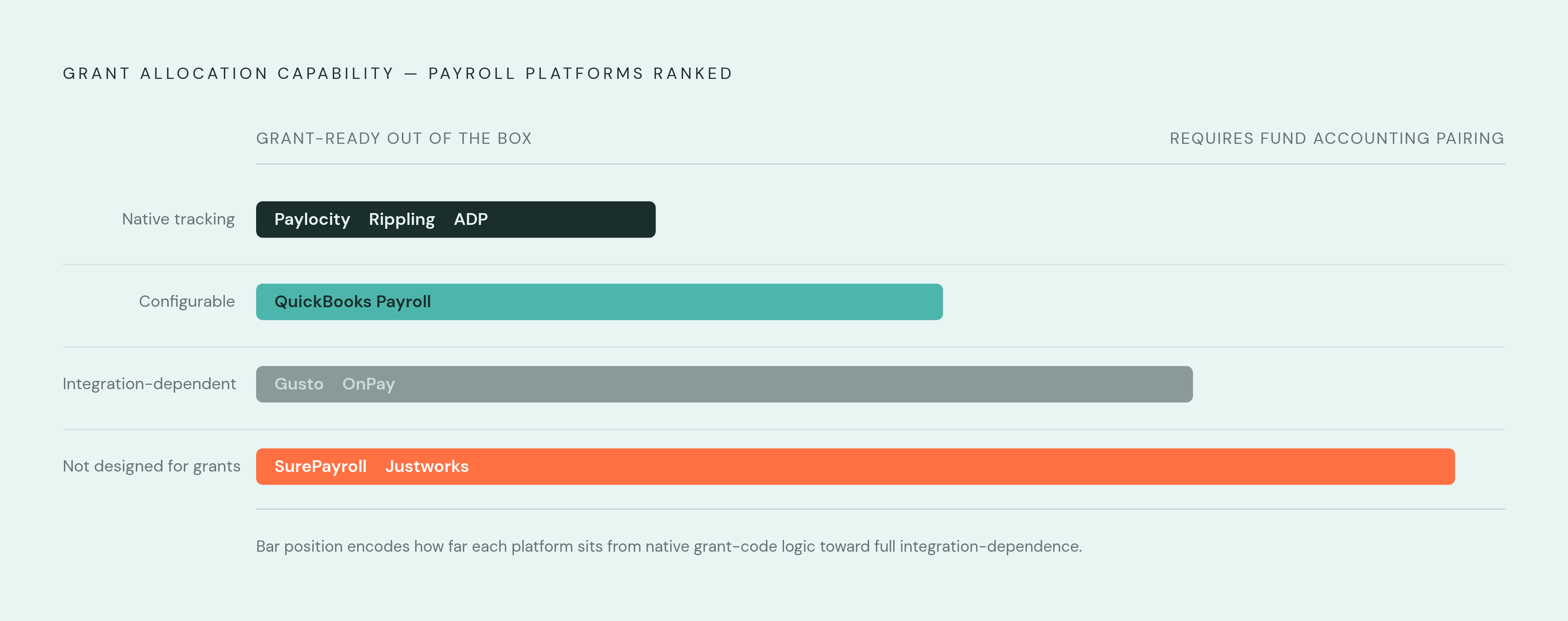
QuickBooks Payroll makes the most sense for nonprofits already running fund accounting in QuickBooks, since payroll labor costs flow natively into the QuickBooks Online general ledger. Class tracking can be configured to categorize expenses by program or grant, though Projects or sub-customers are often the better primary dimension for grant tracking specifically. Reports track grant-restricted fund availability, and higher tiers tie time tracking to programs or grants directly. Pricing starts at a modest monthly base plus a per-payee fee. TechSoup offers discounted QuickBooks Online (Plus or Advanced) access for qualifying nonprofits, though Payroll itself isn't available through TechSoup and must be bought directly from Intuit, worth double-checking before assuming the discount applies. Customer support gets dinged by users as slow to respond, and there's no free tier. The integration advantage evaporates for any nonprofit not already on QuickBooks.
Gusto covers time tracking in its higher tiers, letting staff log hours and categorize by project or grant, and integrates with Aplos and QuickBooks for fund accounting needs. The catch: Gusto doesn't offer native grant-code tracking the way Paylocity, ADP, or QuickBooks do. Grant allocation here depends on pairing Gusto with a separate fund accounting platform. Pricing runs three tiers: Simple at $49 base plus $6 per person monthly, Plus at $80 base plus $12 per employee, and Premium at $180 base plus $22 per employee, meaning a 50-person nonprofit on the Plus plan lands around $680 a month before add-ons. All paid tiers include unlimited payroll runs and automatic tax filing, and Gusto was ranked #1 in customer satisfaction by G2 in 2025. It fits small nonprofits with low grant-allocation complexity or ones already paired with Aplos or QuickBooks.
OnPay integrates with QuickBooks, Xero, and various time-tracking tools for grant cost allocation, with custom reporting and six permission levels, useful for letting a bookkeeper run payroll without touching sensitive employee data. It has no native time-tracking system of its own, though, so grant-code tracking leans entirely on integrations that users describe as more limited than competitors offer. OnPay has offered nonprofit discounts, worth confirming directly since published offers shift. Pricing is a single plan at $49 base plus $6 per employee monthly, with FUTA exemptions for 501(c)(3)s included at no extra charge and unlimited payroll runs. Users note it is straightforward for organizations just starting out, and unlimited reimbursement payments per payroll run is a differentiator worth considering.
Paychex scales for larger nonprofits with complex HR needs and 24/7 support, with payroll tax compliance as its headline strength. TechRepublic notes it charges extra for federal and state unemployment tax administration, a contrast worth flagging against OnPay, which bundles that in. Pricing is custom quote only, and it fits larger or fast-growing nonprofits that need a full-service compliance partner more than they need granular grant-code tagging.
SurePayroll by Paychex is the budget option: $29 base plus $7 per payee monthly per TechRepublic, with a cheaper self-service tier available for organizations willing to compute their own taxes. It covers basic payroll administration and, in the full-service tier, handles tax payments and filings directly. Multi-state payroll and time tracking both cost extra, and HR tools stay basic, so it's built for nonprofits with straightforward needs. An organization expecting to grow into multi-grant complexity should think of this as a starting point, not a destination.
Justworks operates on a PEO model, meaning it co-employs staff alongside the nonprofit, which unlocks large-group benefits pricing that a small standalone organization couldn't get on its own. Pricing runs higher per employee monthly per TechRepublic. The co-employment structure changes the legal employment relationship itself, a tradeoff worth weighing carefully against the grant-documentation features covered above, since a PEO's core value proposition sits somewhere different from job-code granularity or labor distribution reporting.
Line them all up, and the pattern that emerges isn't which platform has the most features. It's which platform's core design assumption matches how a given nonprofit actually splits labor across funding sources. An organization with three federal grants and a dozen job codes needs Rippling's or Paylocity's granularity. An organization living inside QuickBooks already gets more value from that native integration than from bolting on a separate payroll system. And a five-person nonprofit running one small grant might do just fine on OnPay or Gusto, with the fund accounting integration doing the heavy lifting that a bigger platform would otherwise need to build in natively. The question was never really "which payroll software is best." It's closer to "which platform's grant allocation logic matches the shape of your funding," and that answer changes depending on how many funders are asking, in how many different ways, where every dollar of payroll actually went.
Methodology & sources
- Here Are the 7 Best Payroll Software Solutions for Nonprofits in 2025 – Checkwriters
Sourced the description of Checkwriters' dedicated onboarding team and nonprofit-specific compliance features.
- 10 Best Payroll Software for Nonprofit Organizations [2026] | Paylocity
Sourced Paylocity's volunteer management and valuation feature as a nonprofit-specific differentiator.
- The Best Payroll Software For Nonprofits
Provided the nonprofit salary growth figure and details on Paychex, SurePayroll, and Justworks pricing and features.
- Gusto Pricing 2026: Every Plan & Add-On — CASRAI
Provided Gusto's published per-tier pricing figures including base and per-person monthly costs.
- https://www.workstream.us/blog/gusto-pricing
Provided the estimated monthly total for a 50-person nonprofit on Gusto's Plus plan.
- https://www.epa.gov/grants/whats-new-2024-revision-2-cfr-part-200
Sourced the specific changes in the 2024 Uniform Guidance revision, including the Single Audit threshold shift and de minimis indirect cost rate increase.
- https://www.rippling.com/blog/best-payroll-software
Sourced Rippling's job-code granularity and its ability to slice hours by time, project, location, and specific grant.