Automating Payroll Onboarding for New Hires
Automation eliminates manual data entry and compliance gaps that compound with every new hire.
- Written by
- Payroll Picks Editors
- Published
- October 8, 2026
- Reading time
- 9 min read
What this covers
A new hire signs an offer letter on a Friday afternoon, and by Monday morning that single signature has to set off five or six separate chains: payroll setup, benefits enrollment, tax withholding, direct deposit, state registrations. Each one lives in its own portal, with its own login, its own form structure, its own deadline, and no connection to the others. Payroll onboarding keeps breaking down because the systems HR teams work in are structurally fragmented: the same piece of data has to be typed in again at every handoff. HRIS data gets copied into payroll. Payroll data gets copied again into benefits portals. Every one of those re-entries is a fresh chance for a typo, a dropped field, or a missed step, and the chance compounds with each hire. The onboarding software already sits on the market, but many companies still run this process on manual paperwork and spreadsheet tracking, because the manual habit was never replaced even after the tools to replace it arrived. The fragmentation stays invisible until it produces a visible failure: a missed I-9 deadline, a first paycheck that never shows up, a direct deposit routed to the wrong account.
What fragmentation costs when a hire joins payroll
A fragmented onboarding chain produces three kinds of cost that compound with every hire, and all three are preventable once the structure changes. The first is payroll error itself: failing to enter an employee into the payroll system on time, or misconfiguring a W-4, each carries its own cost to fix, and because these errors originate in the onboarding process, they recur every single hire cycle. The second is compliance exposure, and it is immediate: Form I-9 errors carry fines assessed per form, and organizations running manual I-9 processes show materially higher error rates than those using automated, guided workflows. The third cost occurs in retention: when workers experience pay mistakes or delays, they start looking for another job, and younger workers have the least patience for an employer that cannot get a first paycheck right. A quieter cost runs underneath all three: every hour HR spends copying data between portals is an hour not spent on retention work, talent development, or filling the next open role. Fragmentation does not just produce errors. It takes the people who could be preventing the next round of errors and occupies them instead with manual re-entry.
How the fragmented chain works, step by step
Trace the manual path from offer acceptance to first paycheck, and you can see exactly where data gets duplicated and where steps quietly disappear. The chain starts broken: a signed offer letter sitting in an email thread does not notify IT, payroll, or benefits on its own. Someone has to remember, on Monday morning, to kick off each of those chains separately, by hand, and if that someone is out sick or juggling three other hires that week, a chain simply doesn't start. Document collection runs the same way. HR tracks I-9 deadlines, E-Verify submissions, and state-specific new-hire paperwork off memory or a spreadsheet, and a missed reminder turns directly into a missed deadline, with no system catching the gap before it becomes a compliance problem. Payroll enrollment repeats the pattern in a different system: data gathered during hiring gets re-keyed into payroll by hand, and every field retyped is a field that can be retyped wrong. IT provisioning often starts even later: without an automated trigger, someone has to remember to open the ticket to create accounts and set up a laptop, so it frequently gets opened after the new hire has already started. Benefits enrollment runs as a third track, and when it draws from a different data source than payroll, small reconciliation errors build up until a discrepancy appears weeks later. Through all of this, HR has no dashboard showing what's outstanding or for whom. The usual signal that a step got missed is the new hire asking, on payday, where their paycheck is.
What automation replaces
Automation replaces the fragmented chain with a single workflow triggered the moment an offer is accepted, one that moves employee data once, assigns tasks to the right people, and escalates anything left undone. The mechanical definition matters here: automation means the software decides what happens next and who needs to act on it, without a person manually kicking off each step by hand. That is a different thing entirely from digitizing onboarding, which just turns paper forms into PDFs that someone still has to email around. HR Cloud's 2025 guide lays out how the mechanics actually run: an event, usually "offer accepted" inside the applicant tracking system, triggers the workflow; the software activates a pre-built sequence; tasks get assigned to the new hire, the manager, IT, and payroll; reminders fire automatically when something runs late; and the system tracks progress until every task is marked done. For payroll specifically, the gain is that employee data entered once flows into payroll enrollment, benefits, and tax forms without being typed in again, while compliance documents run on deadlines with automatic reminders and built-in E-Verify integration.
Automation does not replace judgment. A person, not a workflow, still has to interpret legal intent in a jurisdiction the company hasn't hired in before, make the call on an edge-case employee classification, or explain a payroll discrepancy to a worried new hire. There's a real risk of trusting automated output without checking it, and that risk runs in both directions: if incorrect employee status, salary structure, or tax residency gets entered at the start, the automated system will produce wrong results quickly and consistently from that point forward. The single-entry model only works if the first entry is accurate and someone is responsible for verifying it. The EU AI Act treats this distinction with some precision. Under Annex III, Point 4, AI tools used for recruitment, performance evaluation, promotion, and task allocation that delegate real decision-making to AI count as high risk, and those high-risk obligations become enforceable from December 2, 2027, under the Digital Omnibus. Payroll automation itself is generally classified as limited or minimal risk under the Act, not high risk, but the underlying principle still applies to the broader onboarding stack: automation that removes human accountability entirely does not comply. The teams that get this right draw a clear line: the system surfaces what needs attention, a person makes the calls that carry legal or financial weight, and accountability stays visible at every step.
The eight steps for building a triggered payroll onboarding workflow
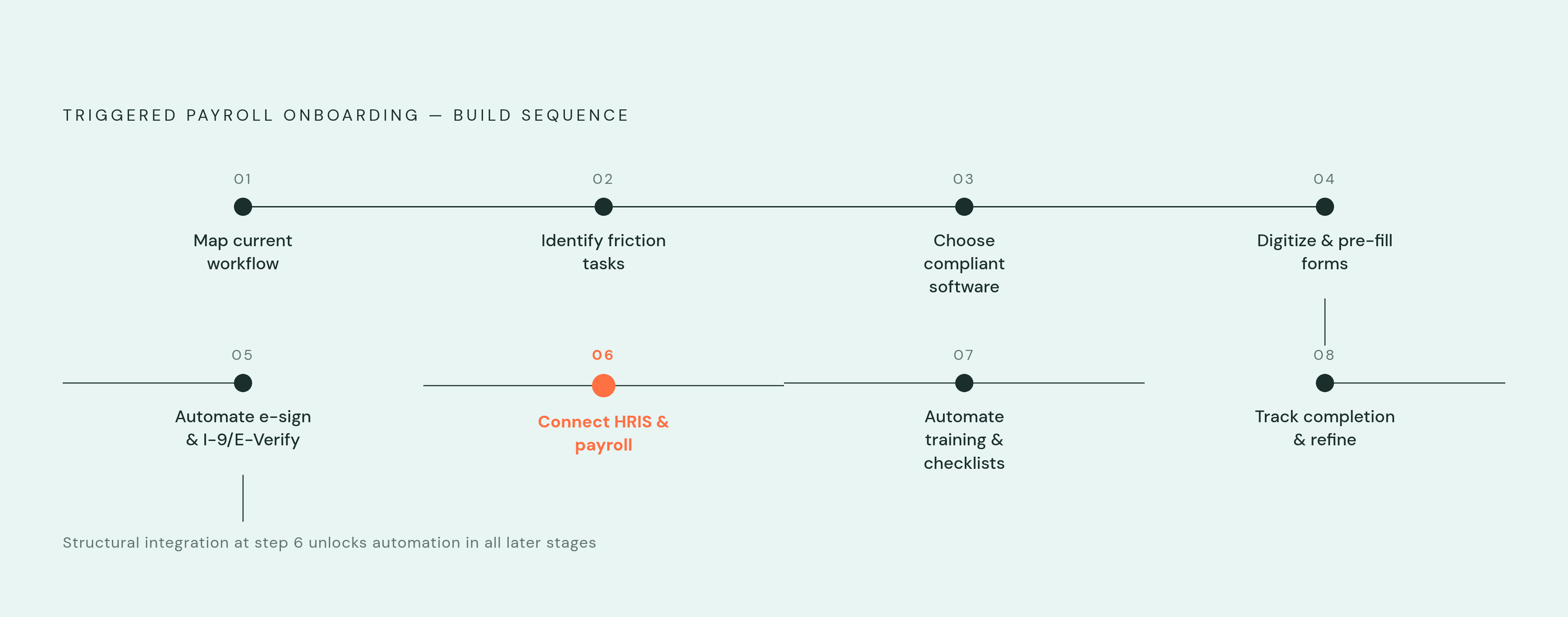
Building a working payroll onboarding workflow follows a fixed order: you start by mapping what currently breaks and end by measuring what the new system actually produces.
Step 1 is to map the current workflow. Document every task between offer acceptance and first paycheck, who owns each one, which system it lives in, and exactly where the handoffs break down. This step surfaces the specific re-entry points that automation is going to eliminate, and skipping it means automating a process nobody has actually looked at closely.
Step 2 is identifying the highest-friction repeating tasks. Compliance document collection, I-9 and E-Verify submission, direct deposit setup, and IT provisioning tickets recur identically with every single hire, and they carry the highest error and penalty risk of anything in the chain.
Step 3 is choosing software built for the company's actual compliance needs. A platform built for US-only I-9 workflows solves a different problem than one built for multi-jurisdiction global payroll, so picking the platform with the longest feature list instead of the one matching the real compliance surface leaves gaps in exactly the jurisdictions or forms the company actually needs covered.
Step 4 is digitizing and pre-filling forms. Paper and emailed PDFs get replaced with digital forms that draw from the single employee record created at offer acceptance, so the same name, address, and tax information never get typed in twice.
Step 5 is automating e-signatures along with I-9 and E-Verify submission. Deadline-driven workflows with automatic reminders turn a missed I-9 deadline into a system escalation rather than something that depended on one person's memory.
Step 6 is connecting the HRIS and payroll systems, the structural fix at the center of the whole approach: employee data flows from the onboarding workflow directly into payroll, with no separate manual entry step in between. Osmose Utilities Services offers a concrete picture of what that fix is worth. The company's prior onboarding process took up to two hours per new hire, and it also generated recurring data-entry errors on top of that time cost. An automated workflow built for field-based employees working outside a central office replaced it, and that removed both the time spent and the errors that came with retyping the same information across systems.
Step 7 automates training assignments and manager checklists, so role-based training gets assigned on day one and managers get task lists with due dates automatically, and the new hire's first weeks no longer depend on a manager remembering to enroll them in anything.
Step 8 is tracking completion and refining the workflow. A dashboard that shows what's outstanding, and for whom, turns progress tracking from inbox-checking into active management, and the completion data collected over time reveals where the workflow still breaks down so it can be tightened. The right place to start is with the steps that repeat identically every hire, proving out one workflow before expanding it to the rest of the process.
Choosing onboarding software for payroll integration
Three things decide whether a platform actually solves this problem: how deep the integration runs, how well the compliance coverage matches the company's actual hiring footprint, and whether onboarding and payroll share one system of record or merely pass data between two separate ones. Integration depth is the variable that matters most. A platform that "integrates with payroll" through a data export still requires a handoff somewhere in the chain, while a platform where onboarding and payroll run on the same underlying system removes that handoff. Compliance coverage needs to match the actual hiring surface a company operates in: US-only I-9 and E-Verify work, multi-state new-hire reporting, global Employer of Record arrangements, and union workforce compliance each call for different capabilities, and a platform strong in one is not automatically strong in the others.
Check seven features in any platform under consideration: automated compliance tracking across I-9, W-4, and state forms; e-signature with deadline enforcement built in; a direct data flow from HRIS to payroll; triggers that open IT provisioning tickets automatically; role-based training that assigns itself; a completion dashboard with escalation; and audit-trail visibility that keeps a human in the loop on record.
The platforms on the market in 2026 split along these lines in different ways. Rippling positions itself as an all-in-one HR, IT, and payroll platform, where onboarding, payroll enrollment, benefits, and device provisioning run on a single system of record. Its AI flags missing information and routes approvals automatically, and you can run global onboarding across multiple countries without needing a separate vendor for each one. Cassandra Margolin, former Head of People Operations at Jasper, has said the platform helps "remove that human error" while making onboarding feel more personal. Rippling fits best if you want to eliminate re-entry across HR, IT, and payroll all at once.
Paylocity is listed among the best onboarding platforms for 2026, builds onboarding into a broader HCM suite spanning payroll and HR, and you can get pricing from the vendor on request. Gusto takes a payroll-first approach aimed at US domestic teams, treating onboarding as an extension of payroll itself: offer letters, e-signed documents, direct deposit, and tax form collection all run directly inside the payroll flow, and Gusto will file new-hire state reporting on a company's behalf when that option is turned on. Its workflow customization stays basic: custom checklists come on all plans and expanded custom workflows come on the Plus tier, but you don't get the advanced multi-step, conditional workflow automation that a more complex organization might need. It suits a small US business if your main need is running payroll correctly without heavy IT provisioning demands.
WorkBright, also listed among the best onboarding platforms for 2026, specializes in I-9 and remote compliance specifically. Employees can complete forms, verifications, and signatures from any device before their start date, and the platform keeps its focus on remote Form I-9 workflows for US employers. It fits best when I-9 compliance for a distributed or field-based workforce is the specific bottleneck a company is trying to solve, rather than a general need to connect onboarding to payroll end to end.