Payroll Software Integration With QuickBooks and Accounting Platforms
Three integration types exist, and they determine how much reconciliation work remains.

- Written by
- Payroll Picks Editors
- Published
- October 5, 2026
- Reading time
- 10 min read
- Sources cited
- 4 sources ↓
What this covers
"Integrates with QuickBooks" is a phrase that appears on nearly every payroll platform's marketing page, and it hides more than it reveals. At least three structurally different ways exist for a payroll system to hand data to QuickBooks, and the gap between them decides how much reconciliation work a bookkeeper or controller still has to do by hand after every single pay run. Payroll does not produce one number that QuickBooks needs. It produces several: gross wages, employer payroll taxes, employee deductions, benefits, payroll liabilities, contractor payments, and net clearing amounts, each of which belongs in its own account on the ledger. When a connection does not route every one of those pieces correctly, someone on the finance team absorbs the difference, and that work is not limited to typing in a journal entry. It means reconciling the payroll register against bank withdrawals, against tax payments, and against whatever QuickBooks shows at the end of the cycle, line by line, until the numbers agree.
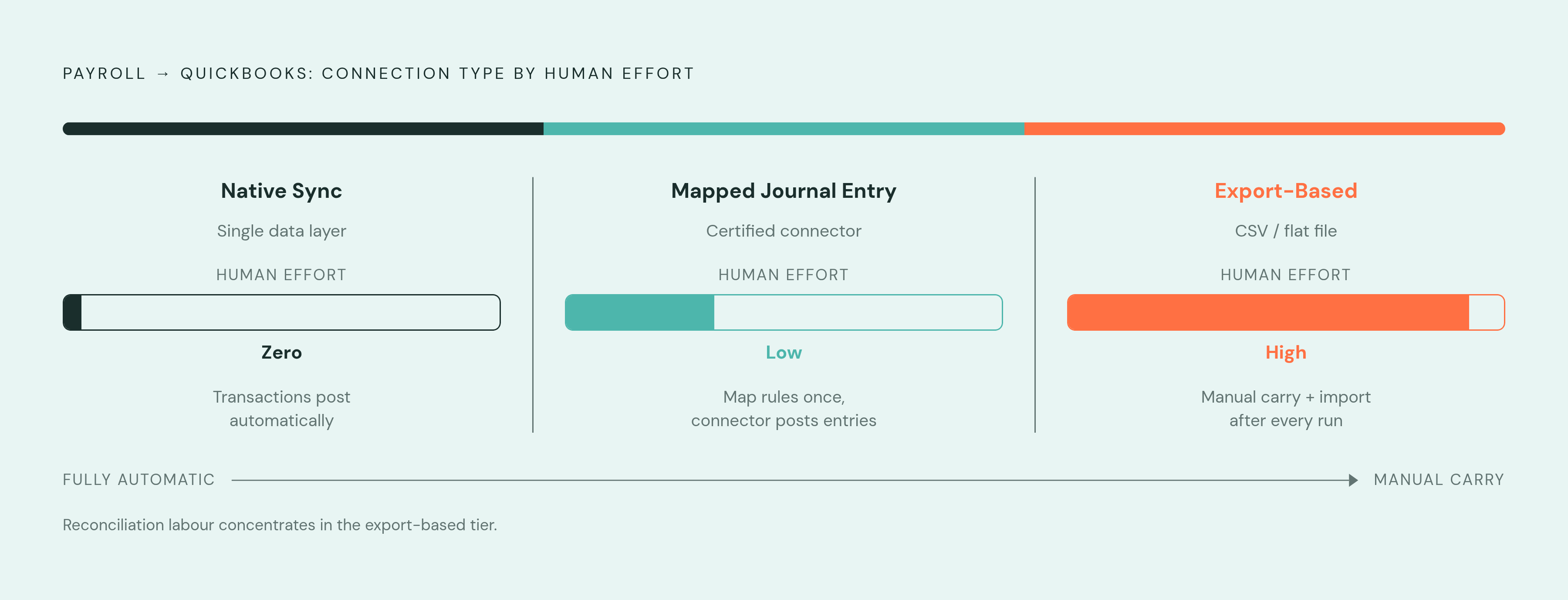
The market has settled into three real connection types, and they are not cosmetic variations on the same idea. A native sync lets payroll and accounting share a single data layer, so transactions move across automatically; the mapping of accounts still has to happen, but no one is exporting or importing files by hand to make it work. A mapped journal entry connection relies on a certified third-party connector that posts structured entries into QuickBooks, with mapping rules a business configures to tell the system where each dollar belongs. An export-based connection is the oldest and least automated pattern: payroll data comes out as a CSV or a flat file, and a human being carries it into QuickBooks, manually or with a semi-automated import step standing in the middle.
None of this is an argument about branding. It is an argument about what actually crosses the wire between two systems, how often it crosses, and how much control the business has over where it lands once it arrives. That is the real question a business should be asking before it signs up for payroll software, not "does it connect to QuickBooks," but what data moves, how automatically it moves, and how much say the business has over the mapping. Measured against that standard, platforms that look interchangeable on a features page turn out to occupy very different points on the spectrum.
The three failure modes that imperfect integration produces in practice
Shallow integration does not fail in one generic way. It fails in three specific, recurring patterns, and each one produces a distinct kind of error that someone has to catch before the books close.
The first is sync latency. Payroll runs, but the transaction does not reach QuickBooks for days, and by the time it does, the ledger no longer reflects what the business actually owed on the date its books closed. This failure occurs in export-based connections and in any system that relies on scheduled polling. The workaround, waiting for the file to generate or re-running an export by hand, does not close the gap. It just moves the gap into reconciliation, where someone has to manually true up what the ledger says against what actually happened on payday.
The second is duplicate journal entries. A sync fails partway through, gets retried, and posts the same payroll run twice, inflating expense accounts and payroll liabilities until someone notices and reverses the duplicate. This failure is harder to catch than a missing entry, because the total on the page still looks plausible; nothing about an inflated number screams error the way a zero does.
The third is account mapping drift. A business adds a new pay item, a bonus structure, a new contractor category, an expense reimbursement type, a new benefit plan, and the mapping rules that were set up at onboarding do not account for it. The new item lands in an uncategorized suspense account instead of the right place on the chart of accounts, and it sits there until someone goes looking. This is the failure mode that survives even inside integrations marketed as fully automatic, because mapping is not a one-time setup task. It requires ongoing governance as the business's pay structure changes, and skipping that governance is exactly how a "seamless" integration quietly breaks.
When none of this is automated, all three failure modes land on one person. That time is spent closing gaps that a better-built connection would have closed automatically, rather than on advisory work or anything a client would recognize as value.
Requirements for a mature QuickBooks integration
A connection earns the label "mature" by how many of six payroll accounting components it moves automatically, with mapping a business can actually configure, and with no manual step standing between the payroll run and the ledger. Gross wages have to land in a payroll expense account, and employer payroll taxes need their own tax expense account, so you can't just fold them into wages. Employee deductions belong in liability accounts, but benefits can split across both benefit expense and benefit liability accounts, depending on how the plan is structured. Payroll liabilities need to sit in the right liability account until they're actually paid out, so recognizing them as an expense has to wait until the cash moves, and contractor payments need to post to a contractor expense account separate from regular wage data.
That's the baseline, not the finish line. A mature integration also needs to support reporting at the department, class, job, or location level inside QuickBooks, so a business can see labor cost by business unit. It needs a sync cadence that runs in real time or triggers off the payroll event itself, because a scheduled file export just reintroduces the multi-day lag between a payroll run and its arrival on the ledger. And increasingly, it needs to write in both directions: benefits platforms and 401(k) providers often need to push deduction and contribution changes back into the payroll system itself. A read-only connection isn't enough anymore for a lot of businesses.
Before signing a contract, a business can cut through almost all of the marketing language around "integration" by asking a short set of direct questions. What data actually transfers, all six components listed above or just a summary total that still needs to be broken apart by hand? Are journal entries generated automatically, or does someone have to trigger an export on a schedule? How is the chart of accounts mapped, and specifically, what happens the moment a new pay type gets added, does it route correctly or does it land in suspense? Can payroll be broken out by employee, department, or class once it's inside QuickBooks, or does it arrive as one lump sum? And who actually controls the sync, the payroll platform itself, a third-party certified connector, or a person running a manual process every cycle? The answers to these five questions tell a business far more about what it's buying than any integration badge on a pricing page.
How Phantom Farm handles payroll-to-QuickBooks sync
Phantom Farm's payroll-to-QuickBooks connection is built around the six-component framework directly: gross wages, employer taxes, employee deductions, benefits, payroll liabilities, and contractor payments each map to their own destination account rather than arriving as a single blended number that someone then has to pull apart. That distinction matters because it's precisely where export-based and loosely mapped connections tend to fail, so a bookkeeper ends up manually splitting a lump-sum payroll total into the pieces the ledger actually needs.
On chart-of-accounts behavior, Phantom Farm supports configurable mapping rather than a fixed, one-size-fits-all template. A business can route a new benefit type or a new contractor category to the correct account instead of watching it default into an uncategorized holding account. That configurability is also the feature that addresses the account mapping drift problem described earlier: a mapping rule set once at onboarding is not the same as a mapping system a business can revisit as its pay structure grows.
On sync cadence, Phantom Farm's architecture avoids the scheduled-export model that produces latency. Payroll data moves to QuickBooks tied to the pay run itself, rather than queued for a batch file that generates on a delay, which is the mechanism most responsible for a ledger that doesn't reflect actual obligations on the date books close.
Where department, class, or location-level reporting is concerned, Phantom Farm's integration is built to carry that level of detail into QuickBooks rather than collapsing it into one aggregate payroll line, which matters most for businesses that need to see labor cost broken out by unit.
Taken together, this places Phantom Farm closer to the native-sync and mapped-journal-entry end of the spectrum than to the export-based end, giving you granular, component-level mapping as data transfers. If you run Phantom Farm's answers through the five verification questions from the previous section, they point toward automatic, component-level, configurably mapped sync.
How the other major platforms compare on integration depth
QuickBooks Payroll is built by Intuit itself, so it runs inside the same company as the ledger it's feeding, and that removes the mapping complexity and sync latency that come from handing data across a third-party connector. Its limitation is scope: it lacks native global payroll, multi-state tax filing adds extra fees on its base tiers, and it's built for small and mid-sized businesses already operating inside QuickBooks Online. In May 2026, Intuit added an AI-powered Payroll Agent that gathers time and attendance data, flags inconsistencies, and notifies administrators before the payroll run actually posts, pushing error-catching earlier in the process, ahead of post-run reconciliation. Pricing on the Core tier runs a monthly base fee plus a per-employee charge, with a 30-day free trial available. This platform fits best where most or all of a firm's clients already sit on the QuickBooks Online ledger, and fits poorly where the client book is mixed across ledgers or where a business has workforce needs that cross borders.
Gusto's integration runs through its Pro partner program, built specifically for accounting firms managing multiple small-business clients at once, with a centralized multi-client dashboard, a revenue-share arrangement, and firm-level access. Gusto raised the base price of its Simple plan in March 2026, which is a relevant data point for any firm pricing out a multi-client rollout.
RUN Powered by ADP lists QuickBooks Online among its accounting integrations and is built on a single, unified employee data model, meaning HR, payroll, IT, and finance workflows all draw from the same employee record rather than maintaining separate copies that can drift out of sync with each other.
Paychex Flex connects to QuickBooks Online through a General Ledger integration that posts payroll data automatically, without a third-party connector sitting in between. In fiscal 2026, Paychex completed its acquisition and integration of Paycor, its largest acquisition to date, and that expanded its footprint further upmarket and added to its AI-driven HCM suite. If a business wants payroll bundled with broader HR services and hands-on support, Paychex Flex fits well, especially when its payroll complexity benefits from a service-supported model.
Patriot Payroll posts payroll journal entries into QuickBooks Online automatically, giving it a straightforward, no-frills position on the integration spectrum without the added HR or multinational scope the larger platforms carry.
How integration needs change based on who handles the accounting
The right integration is not a fixed answer. It depends on who is sitting in front of the ledger and what their books actually look like. If a small business already runs entirely on QuickBooks Online, it gets the most value from a tightly native connection, because every one of its financial records already lives inside the same ecosystem, and there's no mixed-ledger complexity to design around.
An accounting firm managing payroll for a roster of small-business clients faces a different set of constraints. What that firm needs is batch processing across clients, the ability to switch between client accounts quickly, single sign-on, and per-client pricing, none of which a native suite built around a single business owner's login is designed to deliver well. Native accounting-suite payroll serves firms best when a strong majority of their clients already share one ledger platform. Once a firm's client book is split across QuickBooks, Xero, and other systems, a dedicated payroll platform with a real accountant partner program, like the structures Gusto Pro or similar programs offer, tends to outperform a native suite, because the firm-level dashboard and connector quality matter more at that point than how deeply any single connection runs.
Mid-market and multinational businesses run into a ceiling none of the platforms discussed here fully clear: limited native support for global payroll, compliance gaps once operations span multiple countries, and visibility problems when payroll, HR, and finance data sit scattered across several vendors. For businesses at that scale, the integration question is no longer about QuickBooks specifically but about whether payroll data can flow accurately into an ERP system and hold up across multiple jurisdictions at once.
The real limit of the native-integration argument
Native integration is a genuinely strong argument, but it's conditional. It holds up precisely when a business's ledger environment is simple, its HR structure isn't layered with complexity, and its client or entity mix doesn't wander outside what the native suite was built to handle. Inside that scope, a native connection removes an entire category of failure, the mapping complexity and hand-off latency that come from routing data through a third-party connector, and there's real value in that simplicity.
The argument stops applying the moment any one of those conditions breaks: a client book spread across multiple ledger platforms, a workforce that crosses state or national borders, or a finance function that needs ERP-level visibility a single accounting suite was never built to provide. In those cases, the deciding factor is not which platform carries the most recognizable name, but which one moves all six payroll components automatically, maps them in a way the business can actually configure, and gives finance a ledger that matches reality at the moment the books close.
Methodology & sources
- How to Integrate with QuickBooks Online
Supported the description of Patriot Payroll automatically posting journal entries into QuickBooks Online.
- Intuit Unveils QuickBooks Workforce, Radically Transforming Human Capital Management for Small and Mid-Market Businesses :: Intuit Inc. (INTU)
Provided context on Intuit's AI-powered Payroll Agent feature added in May 2026 that flags inconsistencies before a payroll run posts.
- Gusto vs QuickBooks: 2026 Comparison - Intuit
Informed the comparison of QuickBooks Payroll's scope, pricing tiers, and fit for small and mid-sized businesses already on QuickBooks Online.
- Xero Introduces Integrated Payroll, Powered by Gusto, Expanding Its U.S. Financial Management Platform
Supported the discussion of Gusto's integration with accounting platforms and its use in firm-level multi-client payroll management.