How Payroll Software Handles Garnishments and Child Support Orders
Payroll must correctly calculate disposable earnings to avoid legal liability on garnishments.
Wolters Kluwer/CT Corporation data shows wage garnishment volume has climbed 19.5% since 2022, and the first two months of 2026 are already running 20.8% ahead of the same stretch last year. That's a substantial and continuing increase. It's the visible result of several forces landing on employers at once, and it means the payroll department is now doing legal compliance work whether it wants to or not.
Why garnishment volume is rising
Consumer debt has been climbing for years, and debt buyers, the firms that purchase delinquent accounts and pursue collection, have gotten more aggressive about converting judgments into wage orders. That alone would push garnishment counts upward. But the bigger driver sitting on top of it is federal student loans.
The Department of Education resumed Administrative Wage Garnishment on defaulted federal loans after a multi-year pause. The first AWG notices under the resumed program went out in early January 2026, and volume has been rising since. For an employer, this means a borrower who hasn't had a garnishment order in half a decade can show up on payroll's desk with one attached to their very next paycheck, and the payroll team has no lead time to build a process from scratch. The order arrives, and the clock on compliance starts immediately.
Employer legal obligations when a garnishment order arrives
Federal law gives an employer four obligations the moment a valid garnishment order lands, and none of them are optional. Withhold the correct amount. Keep that amount inside the limits set by a federal wage garnishment law. Send the money to whichever court, agency, or creditor the order names. And keep the employee on payroll, because the CCPA specifically bars firing someone over a single garnished debt.
The calculation basis is what trips up even experienced payroll staff. Garnishment limits apply to disposable earnings, not take-home pay, and the two terms are not interchangeable. Disposable earnings mean wages left after only the legally required deductions: federal and state taxes, Social Security, Medicare, state unemployment insurance where it applies. Voluntary deductions, health insurance premiums, 401(k) contributions, union dues, charitable giving through payroll, none of that reduces disposable earnings, even though it very much reduces what runs into the employee's bank account. Running the math against net pay instead of disposable earnings makes the protected amount come out too high, which means the employer is now under-withholding and exposed to liability for the difference.
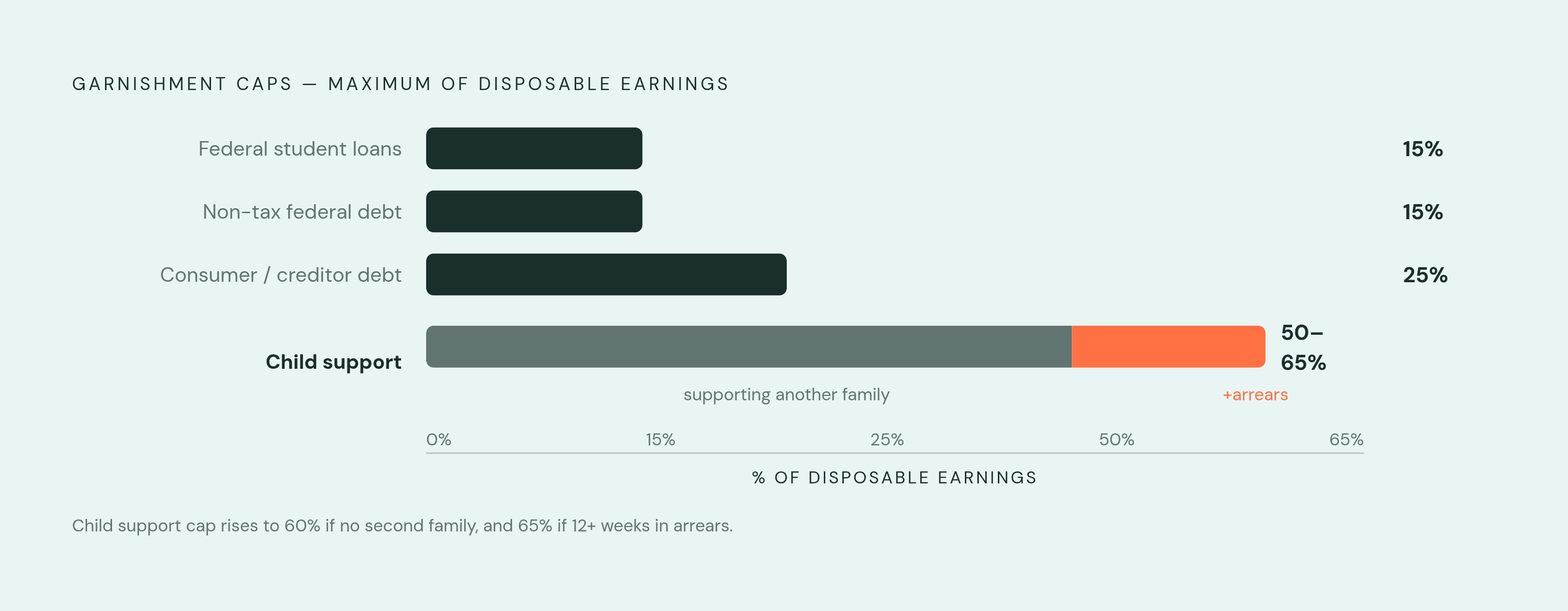
The federal caps themselves vary by order type. Consumer or creditor debt is capped at the lesser of 25% of disposable earnings or the amount by which disposable earnings exceed $217.50 a week. There's a floor built in too: earn $217.50 or less and nothing can be garnished; earn between $217.50 and $290.00 and only the amount above $217.50 is fair game. (Those dollar thresholds move with the federal minimum wage, so they're worth confirming against current Department of Labor guidance rather than treated as fixed forever.) Child support runs higher, up to 50% of disposable earnings if the employee is supporting another spouse or child, 60% if not, with another 5% added on top if the support payments are more than twelve weeks in arrears. Federal student loan garnishment is capped at 15% of disposable earnings, and only after the borrower gets a required 30-day notice. Non-tax federal agency debt, under the Debt Collection Improvement Act, is capped at 15% as well.
State law then sits on top of all of it, and where a state rule is more protective than the federal one, the state rule wins, as DOL Fact Sheet #30 states. Massachusetts protects the greater of 90% of gross weekly wages or 65 times the applicable minimum wage. With the state minimum wage at $15 an hour, that exemption floor climbs well past the federal number, and an employer applying only the federal rule set would garnish an amount the state considers illegal.
How child support withholding works
Child support runs on its own instrument entirely: the Income Withholding for Support order, or IWO, a federally standardized form used in every support case in every state. It's sometimes called a wage assignment, and California's Department of Child Support Services refers to it that way too, but the form and the obligation are the same regardless of the label.
What makes IWOs harder to manage than an ordinary garnishment is who's allowed to issue one. A federal agency overseeing child support enforcement notes that state, tribal, and territorial child support agencies can send an IWO, and so can courts, tribunals, attorneys, and even private individuals. The employer's job is to verify the order regardless of who sent it, which means payroll can't assume legitimacy just because a document looks official. That verification step is a genuine workflow, not a formality.
HHS data cited by Patriot Software show that 75% of all child support payments in the country get collected through wage withholding, and yet only 44% of custodial parents actually receive the full amount they're owed. That gap between how much withholding does and how much still goes uncollected is why the enforcement mechanism carries so much legal weight, and why the timing rules around it are unusually strict.
The federal floor requires withholding to begin no later than the first pay period starting 14 working days after the IWO was mailed. Some states move faster. California requires withholding to start within 10 days of receipt, which leaves an employer almost no room to sit on an order while sorting out paperwork.
The electronic IWO system and its effect on how payroll software connects to child support agencies
The electronic IWO, or e-IWO, replaces the mailed paper order with a digital one. Employers receive the order electronically, send back an acknowledgment (accept or reject), and communicate updates to the agency through the same channel. ACF guidance states there's no cost to the employer to use it, and all 50 states plus three territories now run on the e-IWO process. Employers on the system receive orders the day after the state agency generates them, cutting out the mail delay that used to eat into the 14- or 10-day compliance window.
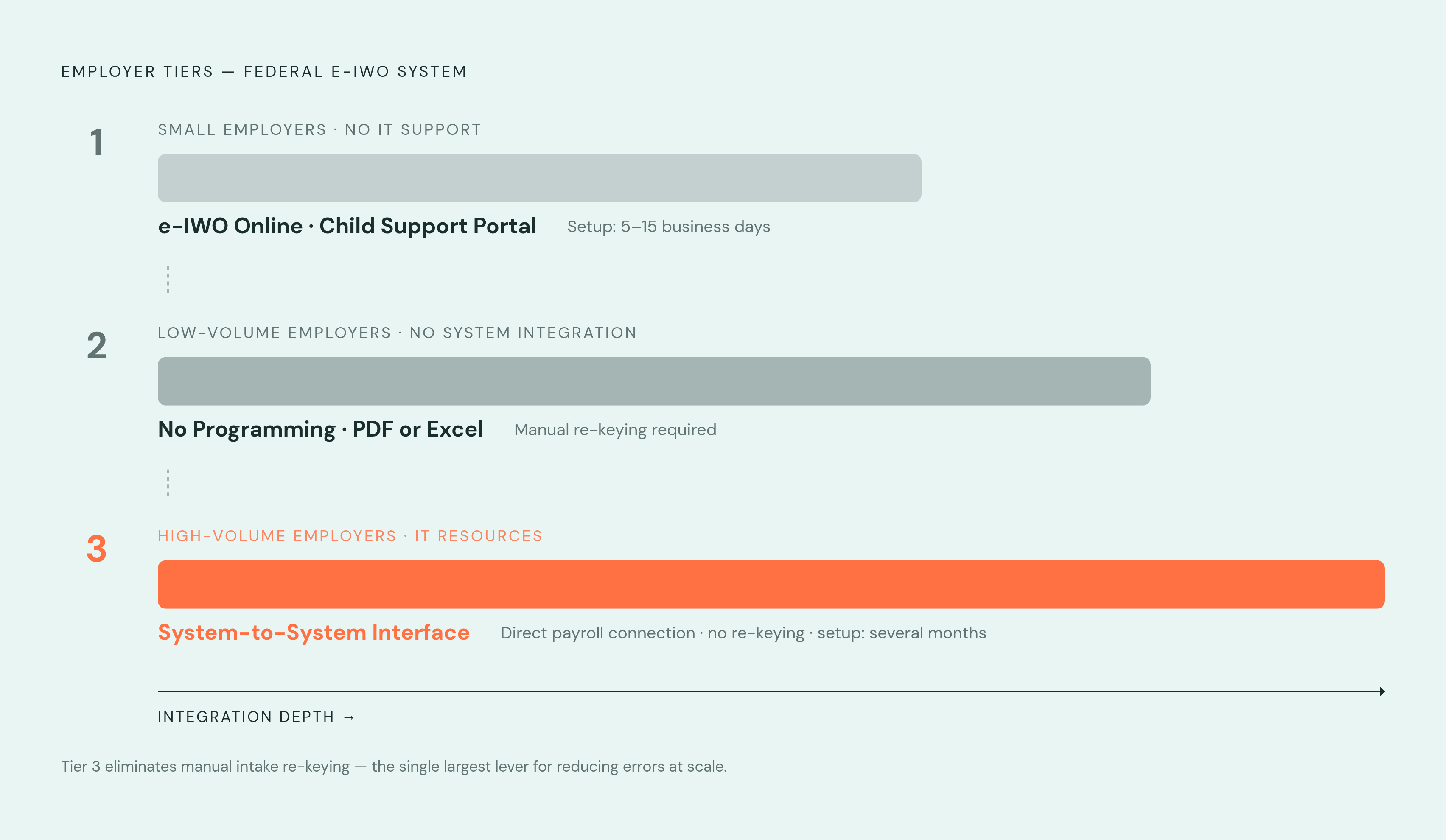
There are three tiers of participation, and they're built for very different kinds of employer. e-IWO Online, run through the Child Support Portal, is aimed at smaller employers without dedicated IT support, and implementation runs 5 to 15 business days. The No Programming tier suits employers with low IWO volume; orders arrive as a PDF or Excel file rather than through an integration. Then there's System-to-System Interface, built for high-volume employers with real IT resources, connecting directly into the payroll system. Setup is more involved and can take several months, but it's the tier suited for high-volume employers with substantial IT resources.
That tier distinction matters more than it sounds. A payroll platform that supports System-to-System e-IWO integration takes the order in electronically and populates the record without anyone re-typing numbers off a PDF. Every manual re-entry point is a place an error can get introduced, so the tier a platform supports is really a proxy for how much risk sits at the intake step.
Payroll Software's Role in the Garnishment Workflow
An administrator enters or imports the order's details, garnishment type, amount or percentage, issuing agency, effective date, and end condition. The software flags the order type so it applies the right rule set, since child support, tax levies, student loan AWG, and consumer debt each carry different caps and different priority in line. Where e-IWO integration exists, the order data arrives electronically and can pre-populate those fields directly, cutting the manual re-keying risk down at the source.
Disposable earnings calculation is the step where software earns its keep. The system separates mandatory deductions from voluntary ones automatically and computes disposable earnings correctly, rather than defaulting to net pay. Given how often this exact distinction gets misapplied by hand, automating it is arguably the single highest-value thing a garnishment feature does.
Withholding calculation and cap enforcement. The software applies the correct federal cap against disposable earnings for that specific order type, applies the minimum protection floor at the $217.50 and $290.00 weekly thresholds, and layers in state law wherever it produces a smaller garnishment than federal law would, the Massachusetts 90%-of-gross-wages rule being a prominent example of that in practice. It also has to adjust automatically when earnings vary, a part-time week, unpaid leave, a bonus period, recalculating each pay period instead of locking in a fixed dollar deduction that risks over-withholding the moment hours drop.
Priority sequencing for multiple garnishments. An employee can have more than one order active at once, and federal tax liens aside, child support is served first. Whatever disposable earnings remain after that determine what's left, if anything, for lower-priority orders, and the software has to track the combined cap across all of them so total withholding never breaches what the CCPA allows in aggregate. Greenshades is one example of a platform built to handle unlimited simultaneous garnishments with priority and arrears tracked automatically, rather than requiring the administrator to run that math by hand.
How platforms on the market approach garnishment support
Garnishment depth is not uniform across payroll platforms, and the right fit depends heavily on employer size, garnishment volume, and how many states the workforce is spread across. Rather than ranking vendors, it's more useful to evaluate them against a fixed set of capability questions.
Does the platform actually calculate disposable earnings correctly, excluding only the mandatory deductions? Does it cover all the major garnishment types, child support, tax levies, student loan AWG, consumer debt, or only some of them? Can it handle an employee with multiple simultaneous garnishments and sequence them by the correct priority? Whether it applies state-specific rules automatically, or someone on the payroll team has to configure each state manually, is the question. Does it connect to e-IWO, and if so, at which tier, PDF and Excel intake or full System-to-System integration? Does it remit payments to the agency directly, or does it stop at calculating the amount and leave disbursement to the employer? And is garnishment processing bundled into the base price, or billed as an add-on?
A range of platforms currently market garnishment calculator functionality, and each targets a different slice of the employer market. UZIO is a cloud-based system built around integration with benefits and HR. Everee positions itself on speed and simplicity. QuickBooks Online carries broad market reach generally. APS Payroll offers an all-in-one HR and payroll setup, while Paycor markets itself toward HR leaders and people managers specifically. PayNorthwest targets mid-size and growing companies. Payroll Relief is oriented toward accountants and accounting firms, including payroll service bureaus, a narrower audience than most of the others on this list. SBS Payroll HR Suite bundles in labor cost tracking and ACA reporting alongside garnishment handling. ScalePEO runs on the PEO model, bundling payroll with benefits, HR, and compliance under one contract. Square Payroll offers full-service payroll with automated tax filings built in. StarGarden HCM is aimed at organizations with 200 or more employees, and Wagepoint targets smaller organizations within that range.
None of these platforms is disqualifying on its face, and the fit really comes down to volume and complexity: an employer running garnishments across a dozen states with hundreds of active orders needs a different depth of automation than one processing an occasional single order. The capability checklist above is the more durable filter, since vendor feature sets change faster than any list of names can track.